
Small Business Cybersecurity Is Now a Business Issue
Cybersecurity used to be discussed primarily as a technical problem.
Install antivirus software.
Configure a firewall.
Use better passwords.
Keep software updated.
Those measures still matter, but they no longer describe the entire problem.
Modern businesses depend on email, Microsoft 365 and other cloud applications, laptops, mobile devices, Wi-Fi, remote access, online banking, customer information, vendors, backups, and internet connectivity.
That means a cybersecurity incident can become much more than an IT inconvenience.
It can become an operational problem.
Employees may lose access to systems.
Customer information may be exposed.
Files can become unavailable.
Email accounts can be compromised.
Fraudulent payment instructions can be sent.
Operations can stop.
Management can suddenly find itself making important decisions under pressure.
That is why cybersecurity should be viewed through the same lens leadership uses for other significant business risks.
NIST's Cybersecurity Framework 2.0 reflects that evolution. Its six functions begin with Govern, emphasizing that cybersecurity risk needs organizational oversight alongside Identify, Protect, Detect, Respond, and Recover.
For a small or mid-sized company, that leads to a much better question than:
“Which cybersecurity product should we buy?”
The better question is:
“How should our business manage cybersecurity risk?”
Also read: https://nettech.com/what-are-managed…sinesses-nettech/
Why Small Businesses Need a Layered Cybersecurity Strategy
There is no single cybersecurity product that solves cybersecurity.
A firewall cannot prevent every employee from entering credentials into a convincing phishing page.
Endpoint protection cannot compensate for every weak administrative account.
MFA does not replace backups.
Backups do not prevent account compromise.
Employee training does not patch an outdated server.
And even strong preventive controls do not eliminate the need to detect suspicious activity or prepare for recovery.
Cybersecurity works best as a layered system.
NETTECH's client intelligence strategy specifically calls for practical, layered security rather than fear-based selling or unrealistic promises of complete protection.
A useful business model is:
Govern → Identify → Protect → Detect → Respond → Recover
Those are also the six functions of NIST CSF 2.0. NIST says that, considered together, they provide a comprehensive view of managing cybersecurity risk.
Let's translate that framework into what a growing business actually needs to think about.
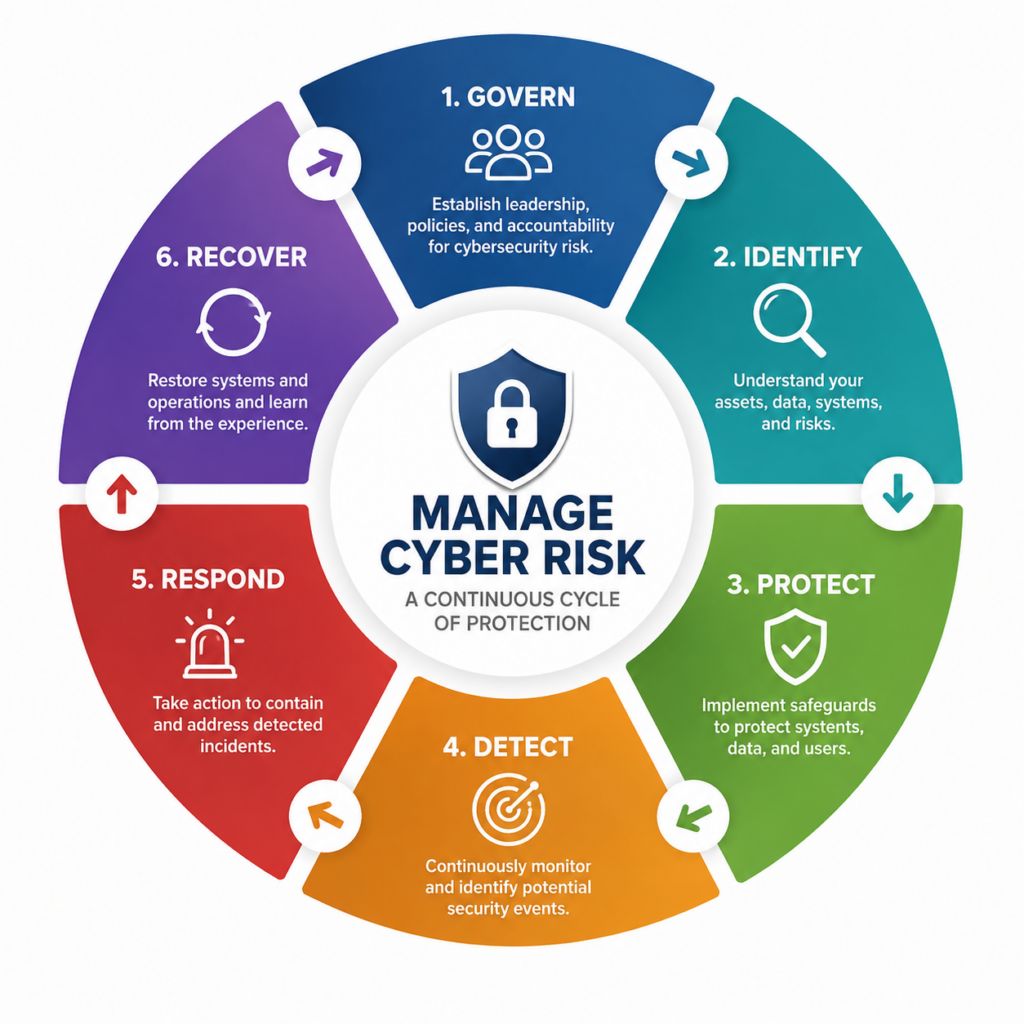
1. Govern: Make Someone Responsible for Cybersecurity
One of the most dangerous cybersecurity conditions is ambiguity.
Who is responsible for security?
The owner?
Office manager?
Internal IT person?
Managed IT provider?
Cybersecurity vendor?
Microsoft?
Employees?
The answer may involve several of them, but responsibilities should be defined.
Governance means leadership understands that cybersecurity decisions have business consequences and establishes responsibility for managing them.
That includes questions such as:
- What information and systems matter most?
- What level of risk is acceptable?
- Who owns cybersecurity decisions?
- Which responsibilities are outsourced?
- What requirements come from customers, insurers, contracts, or regulations?
- How are vendors evaluated?
- Who receives security alerts?
- Who has authority during an incident?
- How are cybersecurity priorities funded?
NIST has continued to emphasize the relationship between cybersecurity and broader enterprise risk management. Its 2026 guidance specifically addresses communication about cybersecurity risk and the role of senior leadership in risk-management responsibilities.
NETTECH Leadership Principle
Cybersecurity without ownership becomes a collection of tools.
A business needs both controls and accountability.
2. Identify: Know What You Are Protecting
You cannot effectively protect technology you do not know exists.
Growing companies often accumulate technology gradually:
a new laptop here,
another cloud application there,
a former employee's account,
an old server,
a new wireless device,
a vendor with remote access,
an administrator account nobody remembers creating.
Over time, visibility decreases.
A cybersecurity program should begin with understanding the environment.
That includes:
People — employees, contractors, administrators and vendors.
Devices — laptops, desktops, servers, mobile devices and network equipment.
Accounts — email, cloud applications, administrative credentials and service accounts.
Applications — Microsoft 365, industry software, accounting platforms and other cloud services.
Data — customer information, financial records, intellectual property and operational files.
Infrastructure — firewalls, switches, Wi-Fi, servers and internet connections.
Dependencies — vendors, cloud platforms and systems the company cannot operate without.
NIST's small-business guidance is intentionally risk-based rather than one-size-fits-all. Organizations are expected to consider their own priorities, threats, vulnerabilities and requirements.
That is critical.
A 20-person construction company and a 20-person healthcare organization may have the same number of employees while facing very different technology risks.
3. Protect Identities: Passwords Alone Are Not Enough
In a cloud-centered business environment, identity is part of the security perimeter.
If an attacker gains control of a legitimate employee account, they may not need to “hack through” the office firewall.
They may simply log in.
That makes identity security one of the most important layers in modern small-business cybersecurity.
Use Multifactor Authentication
MFA requires another form of verification in addition to a password.
It is particularly important for:
- email,
- Microsoft 365,
- administrative accounts,
- remote access,
- financial systems,
- cloud applications,
- and other sensitive accounts.
But MFA should not become an excuse to ignore account management.
Businesses should also review:
password practices,
administrative privileges,
shared accounts,
inactive accounts,
employee departures,
vendor access,
and unnecessary permissions.
Principle of Least Privilege
Employees should generally have the access needed to perform their jobs—not unlimited access simply because granting it is convenient.
The same principle should apply to administrators and vendors.
4. Secure Email and Train Employees to Recognize Phishing
Email remains one of the places where technology and human decision-making collide.
A convincing message may appear to come from:
a customer,
vendor,
executive,
bank,
Microsoft,
delivery company,
or coworker.
The objective may be to steal credentials, redirect a payment, deliver malware, or persuade an employee to reveal sensitive information.
Technology should help filter malicious email, but employees also need practical habits.
Teach employees to slow down when a message involves:
Urgency
Money
Passwords
Unexpected attachments
Account changes
Unusual payment instructions
Requests to bypass normal procedures
The goal is not to turn employees into cybersecurity engineers.
It is to give them a simple decision framework:
Stop → Inspect → Verify → Report
For example, an unexpected request to change a vendor's banking information should be verified using a known communication channel rather than replying to the same email.
That is cybersecurity translated into a business process.
5. Protect Every Business Device
Every endpoint is a potential doorway into the environment.
Laptops and desktops should not simply be purchased, handed to employees, and forgotten.
A managed endpoint strategy may include:
- standardized configuration,
- endpoint security,
- software inventory,
- patch management,
- device encryption where appropriate,
- administrative controls,
- monitoring,
- replacement planning,
- and secure decommissioning.
This becomes especially important when employees work remotely.
A laptop used in airports, homes, hotels, client sites, and coffee shops operates outside the physical protections of the office.
The security strategy has to follow the device.
6. Patch Software and Replace Unsupported Technology
Security vulnerabilities are discovered continually.
When vendors release security updates, organizations need a process for evaluating and deploying them.
That sounds simple until a company has:
50 computers,
multiple servers,
network equipment,
industry-specific applications,
remote employees,
and several cloud systems.
Now patching is not a reminder.
It is an operational process.
Businesses should also understand the difference between outdated and unsupported technology.
A system may still turn on every morning while no longer receiving appropriate security updates or vendor support.
That creates a larger technology-lifecycle question.
“It still works” is not the same as “it is still appropriate for the business.”
7. Secure the Business Network
The network connects employees, devices, applications, cloud services and the internet.
Its security deserves more attention than simply changing the Wi-Fi password.
Depending on the environment, businesses should evaluate:
firewall configuration,
business-grade wireless infrastructure,
guest networks,
network segmentation,
remote access,
firmware updates,
administrative credentials,
switches,
access points,
internet redundancy,
and monitoring.
Network segmentation can be especially useful because not every device necessarily needs unrestricted access to every other part of the environment.
A guest device, for example, generally should not operate as though it belongs to the same trusted environment as critical business systems.
Network design therefore affects both performance and security.
8. Protect Microsoft 365 and Cloud Applications
Moving to the cloud does not eliminate cybersecurity responsibility.
It changes it.
Cloud providers may secure the underlying platform, but businesses still make decisions about:
who has access,
which accounts are administrators,
whether MFA is enabled,
how files are shared,
how former employees are removed,
what third-party applications can connect,
and how information is retained or backed up.
This is why cloud security should be treated as part of identity and access management rather than assuming:
“Microsoft handles security.”
Microsoft secures its platform.
Your organization still has to manage how your people use it.
9. Back Up Data—but Design for Recovery
Backups are essential.
But one of the most dangerous cybersecurity assumptions is:
“We have backups, therefore we can recover.”
Those are different claims.
A strong backup strategy should answer:
- What is backed up?
- How often?
- Where are copies stored?
- Can attackers reach those copies?
- How long are backups retained?
- Who receives failure alerts?
- Have restores actually been tested?
- How long would recovery take?
- Which systems must be restored first?
This leads to four concepts that business leaders should keep separate:
Backup → Restore → Disaster Recovery → Business Continuity
Backup creates copies.
Restore retrieves information.
Disaster recovery rebuilds technology capabilities.
Business continuity addresses how the organization continues operating through disruption.
A successful backup job is therefore not the finish line.
Recovery is the business outcome.
10. Detect Problems Instead of Relying Only on Prevention
Even strong defenses can fail.
That makes detection essential.
Businesses should have ways to identify potentially suspicious activity, such as:
unexpected account behavior,
malware detections,
security alerts,
unusual administrative activity,
failed backups,
unexpected changes,
or other indicators appropriate to the environment.
This is an important maturity shift.
A basic security strategy asks:
“How do we keep attackers out?”
A mature strategy also asks:
“How would we know if something got through?”
That is why NIST places Detect between Protect and Respond in CSF 2.0.
11. Have an Incident Response Plan Before You Need It
Imagine discovering suspicious activity at 8:15 Monday morning.
Who makes the first decision?
Who contacts IT?
Should a computer be disconnected?
Who communicates with employees?
Who determines whether accounts are compromised?
Who contacts cybersecurity insurance?
Who evaluates legal or regulatory obligations?
Who speaks to customers if communication becomes necessary?
These questions are difficult enough under normal circumstances.
During an incident, they become much harder.
An incident-response plan does not need to predict every possible attack.
It should establish roles, communication paths, escalation procedures, important contacts, and initial decision-making authority.
Preparation reduces improvisation.
12. Test Recovery Before a Real Emergency
A recovery plan that has never been tested contains assumptions.
Testing exposes them.
Maybe a backup is incomplete.
Maybe credentials are unavailable.
Maybe an application depends on another system nobody documented.
Maybe recovery takes 14 hours when leadership assumed it would take two.
Maybe the only person who knows the procedure is on vacation.
Testing is where a theoretical recovery capability becomes an operational one.
NIST's risk-management guidance for smaller organizations emphasizes resilience and a flexible, risk-based approach rather than treating security as a static checklist.
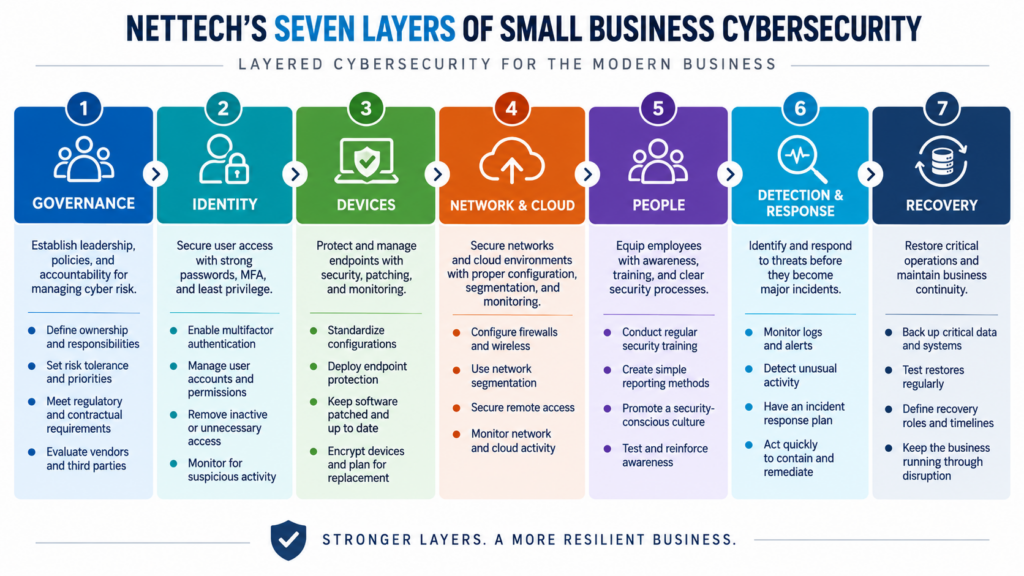
The NETTECH Small Business Cybersecurity Model
A useful way for leadership to evaluate cybersecurity is through seven business layers:
| Layer | Leadership Question |
|---|---|
| 1. Governance | Who owns cybersecurity risk? |
| 2. Identity | Who can access our systems and data? |
| 3. Devices | Are our computers and endpoints properly protected and managed? |
| 4. Network & Cloud | Are connectivity and cloud environments securely configured? |
| 5. People | Can employees recognize and report common threats? |
| 6. Detection & Response | Would we know something was wrong, and who would act? |
| 7. Recovery | Could we restore critical operations after an incident? |
If leadership cannot confidently answer one of those questions, that does not automatically mean the business is insecure.
It identifies where the next conversation should begin.
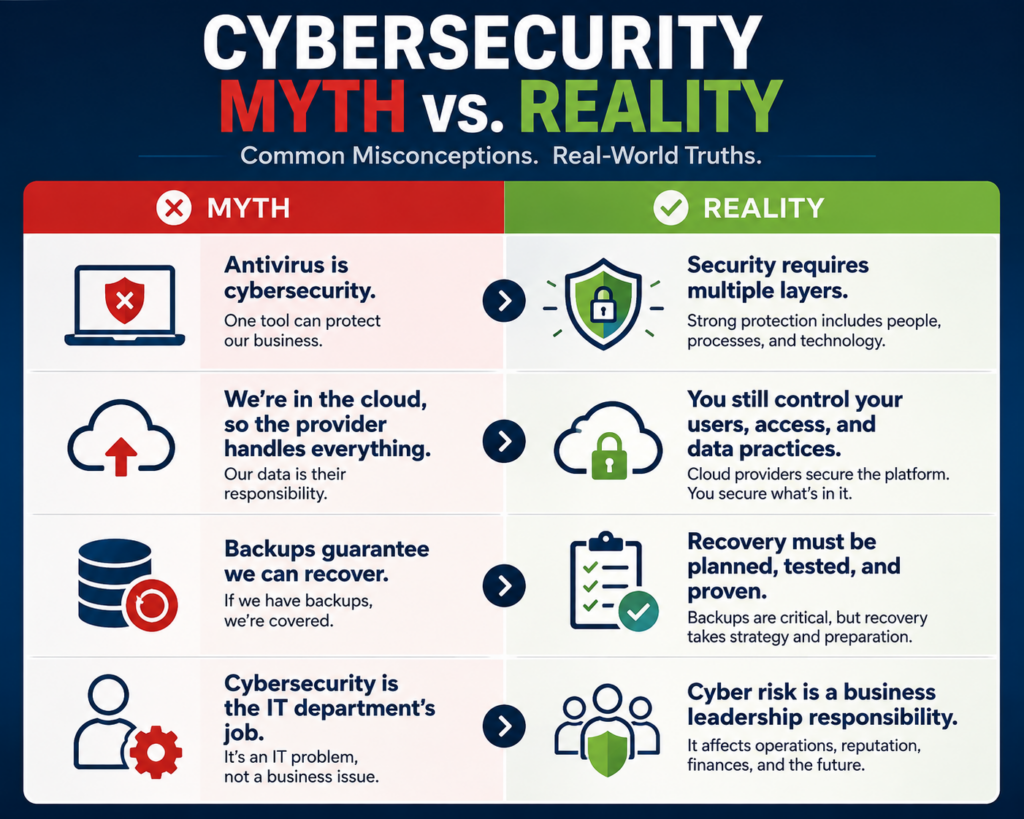
Cybersecurity Myths vs. Reality
Myth: “We're too small for anyone to care about us.”
Reality:
Cybersecurity should be based on the systems, information and operational dependencies you have—not on an assumption that company size makes you invisible.
Myth: “We have antivirus, so we're protected.”
Reality:
Endpoint security is one layer. Identity, email, networks, patching, backups, employees, monitoring and recovery all address different parts of the risk.
Myth: “Our data is in the cloud, so cybersecurity is the provider's responsibility.”
Reality:
Cloud providers protect their infrastructure, while customers still make critical decisions about accounts, permissions, authentication, sharing and connected applications.
Myth: “Cybersecurity is the IT company's problem.”
Reality:
IT providers may manage important controls, but leadership still owns business risk. Responsibilities should be clearly defined.
Myth: “A backup means we can recover from ransomware.”
Reality:
A backup is valuable only if the necessary data is protected, available, usable and recoverable within a timeframe the business can tolerate.
Myth: “Good cybersecurity means we won't get attacked.”
Reality:
Cybersecurity is risk management. The objective is to reduce likelihood and impact while improving the organization's ability to detect, respond and recover.
How Much Cybersecurity Does a Small Business Need?
There is no universal answer.
The right level depends on factors such as:
- industry,
- data sensitivity,
- employee count,
- customer requirements,
- contractual obligations,
- regulations,
- remote work,
- cloud usage,
- business-critical applications,
- operational dependence on technology,
- and the potential impact of downtime.
This is precisely why NIST describes the Cybersecurity Framework as not one-size-fits-all and encourages organizations to consider their own risk tolerance, priorities, threats, vulnerabilities and requirements.
A five-person accounting practice holding sensitive financial information may need controls that differ substantially from a five-person retail operation.
Cybersecurity maturity should follow risk, not ego or company size.
When Should You Get a Cybersecurity Assessment?
A cybersecurity assessment is useful when leadership does not have a clear picture of the organization's current controls, risks and responsibilities.
It becomes particularly valuable when:
- the business is growing quickly,
- employees work remotely,
- a new location is opening,
- cybersecurity insurance requirements are changing,
- customers are asking security questions,
- technology has accumulated without a formal plan,
- leadership is uncertain whether backups are recoverable,
- a security incident or near miss has occurred,
- or nobody can clearly explain the company's current cybersecurity posture.
An assessment should not simply produce a frightening list of technical deficiencies.
It should help leadership prioritize.
What matters most?
What needs attention now?
What can wait?
What business risk does each recommendation address?
What is the practical next step?
That is how cybersecurity becomes manageable.
How to Choose a Cybersecurity Partner
A good cybersecurity provider should be able to discuss more than security products.
Ask:
How do you assess risk?
Look for an approach that considers business operations, technology, users, data and actual dependencies.
How do you prioritize recommendations?
Not every finding has equal business impact.
How do you manage identity and MFA?
Identity deserves explicit attention.
How are endpoints and networks protected?
Ask about ongoing management, not just installation.
How do you handle backups and recovery?
Look for testing and recovery thinking.
How do you monitor and respond?
Understand what happens when an alert occurs.
How do you protect your own privileged access?
A technology provider may have significant access to client systems. Provider security matters.
How do you communicate with leadership?
Cybersecurity findings should be translated into risk and priorities rather than delivered as unexplained technical jargon.
NETTECH's positioning is intentionally consultative rather than transactional: understand the business first, then recommend technology that addresses real risks and operational needs.
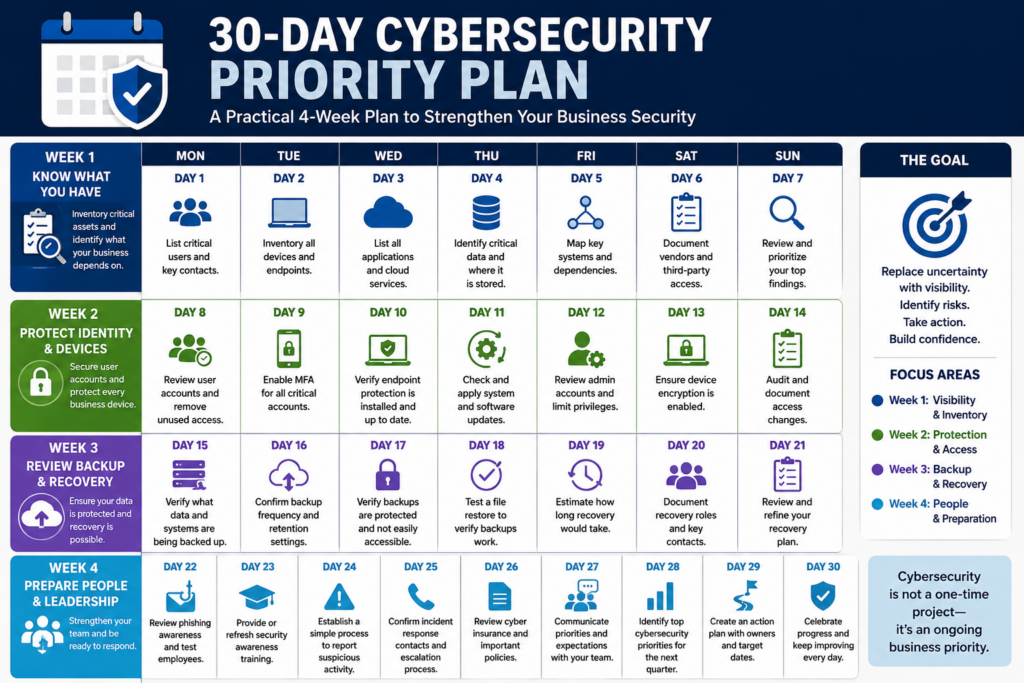
A Practical 30-Day Cybersecurity Priority Plan
Business owners who are unsure where to start can organize the first month around four questions.
Week 1 — Know What You Have
Inventory critical users, devices, applications, data, administrators and vendors.
Identify the systems the business cannot operate without.
Week 2 — Protect Identity and Devices
Review MFA, administrative accounts, employee access, endpoint protection and patch status.
Remove unnecessary or outdated access.
Week 3 — Review Backup and Recovery
Verify what is protected.
Review backup alerts.
Test a meaningful restore.
Document who is responsible for recovery.
Week 4 — Prepare People and Leadership
Review phishing awareness.
Establish a reporting method.
Define incident contacts.
Identify the organization's top cybersecurity priorities for the next quarter.
The goal after 30 days is not to declare cybersecurity “finished.”
It is to replace uncertainty with visibility and priorities.
Frequently Asked Questions About Small Business Cybersecurity
What cybersecurity does a small business need?
Most businesses should consider identity protection and MFA, endpoint security, email protection, software patching, network security, backups, access controls, employee awareness, monitoring, incident response and recovery planning. The exact combination should be based on the organization's risk and operations.
Is antivirus enough for a small business?
No. Antivirus or endpoint security addresses only part of the risk. Modern cybersecurity also involves identity, email, cloud applications, networks, patching, employee behavior, backups, monitoring and recovery.
Does a small business need multifactor authentication?
MFA is an important protection for business accounts, particularly email, cloud services, remote access, administrative accounts and other sensitive systems. It adds another verification layer if a password is compromised.
How often should a small business perform a cybersecurity assessment?
There is no single interval appropriate for every organization. Assessments should be considered periodically and when meaningful changes occur, such as rapid growth, new locations, cloud migrations, major technology changes, new contractual requirements, or security incidents.
What is the NIST Cybersecurity Framework?
The NIST Cybersecurity Framework is voluntary guidance designed to help organizations understand, assess, prioritize and communicate cybersecurity risk. CSF 2.0 organizes outcomes into six functions: Govern, Identify, Protect, Detect, Respond and Recover.
Can a managed IT provider handle cybersecurity?
A managed IT provider may manage many cybersecurity responsibilities, depending on its expertise and agreement. Businesses should explicitly define responsibilities and evaluate the provider's own security practices rather than assuming all MSPs provide the same cybersecurity capabilities.
What is a cybersecurity risk assessment?
A cybersecurity risk assessment examines an organization's systems, users, data, controls, vulnerabilities and business dependencies to identify and prioritize cybersecurity risks. Its value lies in turning technical findings into practical priorities for leadership.
What You Should Do Next. . .
Do not begin by buying another cybersecurity product.
Begin by determining what your business needs to protect, where the largest risks exist, and whether your current security layers work together.
Ask three questions:
Do we know our biggest cybersecurity risks?
Do we know who is responsible for managing them?
Could we detect, respond to, and recover from an incident today?
If those answers are unclear, a cybersecurity assessment is a logical next step.
NETTECH helps growing businesses evaluate cybersecurity in practical business terms—identifying meaningful gaps, prioritizing improvements, and building layered protection around the systems, people and information the organization depends on.
The goal isn't more security products. It's greater confidence that your business is prepared.