
Cybersecurity becomes real when a payroll account is locked, a vendor's payment instructions suddenly change, or customer files cannot be opened on Monday morning. A small company may have excellent antivirus software and still be exposed through an administrator account, an untested backup, a former employee's login, or a rushed accounts-payable process.
The good news is that you do not need an enterprise-size security department to make meaningful progress. You need a named owner, an inventory of what matters, a few strong controls applied consistently, and a recovery plan your team has rehearsed. This guide turns those principles into decisions your business can make.
Quick answer: Small business cybersecurity is the ongoing practice of protecting the people, accounts, devices, networks, data, and workflows a company needs to operate. Start by identifying critical systems and sensitive information; require multifactor authentication (MFA); keep devices and software updated; limit access; verify payment changes by a separate channel; maintain and test protected backups; monitor for suspicious activity; and prepare an incident response plan. Measure whether those safeguards work, then improve them as the business changes.
Why cybersecurity is a business decision
An attack does not have to involve sophisticated malware to cause harm. A criminal can sign in with a stolen password, imitate a supplier, change a bank account, or use a legitimate employee account to access shared files. The resulting cost may include interrupted service, lost revenue, investigation and restoration work, fraudulent payments, contractual disputes, and damaged trust.
The FBI's Internet Crime Complaint Center describes business email compromise as a scheme that can involve the takeover of legitimate email accounts to induce unauthorized transfers. That is why a secure payment approval process belongs beside technical defenses. Source: FBI IC3.
For leadership, the first question is not “Which security product should we buy?” It is: What must keep working, what information are we responsible for, and how would we know if either were at risk? A dental practice, a distributor, and a professional-services firm may use similar laptops, but their data, obligations, vendors, and downtime tolerances differ.
A useful framework: Govern, Identify, Protect, Detect, Respond, Recover
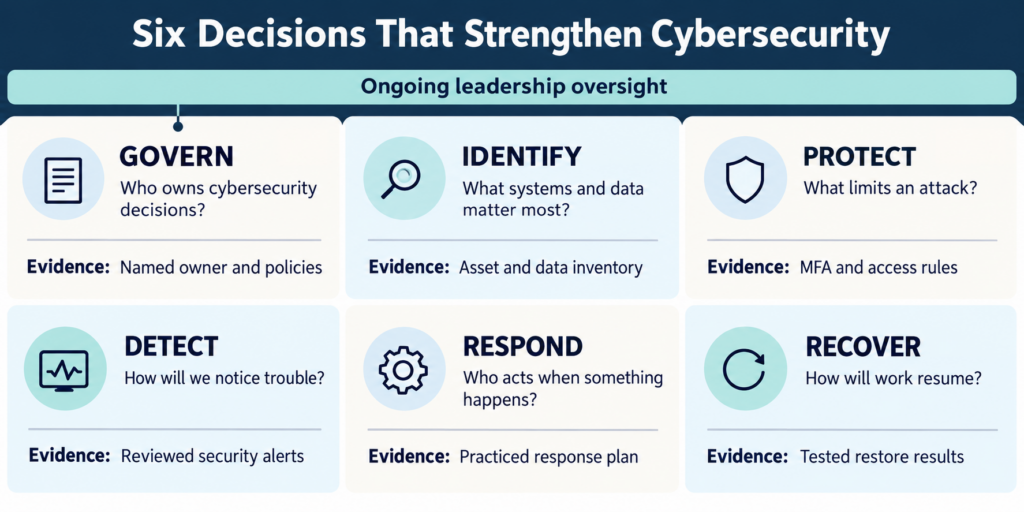
The NIST Cybersecurity Framework 2.0 Small Business Quick-Start Guide organizes risk management into six functions. It is a voluntary framework and a way to structure decisions; adopting it alone does not certify compliance.
| Function | The business question | Practical evidence |
|---|---|---|
| Govern | Who owns risk decisions and budgets? | Named executive sponsor, policies, provider responsibilities |
| Identify | What systems, data, and vendors matter most? | Asset and data inventory, critical-process list |
| Protect | What makes compromise less likely or limits its reach? | MFA, updates, access rules, encryption, backups |
| Detect | How would we notice misuse or a failing safeguard? | Reviewed alerts, account logs, endpoint and backup status |
| Respond | Who makes the first calls and decisions? | Contact tree, incident playbooks, rehearsed escalation |
| Recover | How do we safely resume essential work? | Restore tests, recovery order, business workarounds |
This framework prevents a common planning error: spending everything on prevention while leaving detection, response, and recovery undefined. Source: NIST SP 1300.
1. Assign an owner and inventory the business
The owner or general manager need not configure a firewall. Someone in leadership does need authority to decide priorities, accept residual risk, approve spending, and insist that issues are closed. Give that person a technical counterpart, whether an internal administrator or an outside provider. Write down which party handles identity administration, patches, backups, alerts, incident escalation, and vendor coordination.
Build a simple register with one row per important system: business purpose, owner, administrator, data held, vendor, users, MFA status, backup method, and the consequence of a one-day outage. Include email, Microsoft 365 or Google Workspace, finance and payroll, line-of-business software, website and domain registrar, cloud storage, networking gear, remote access, and any shadow tools staff actually use.
Then map sensitive information: customer and employee records, financial details, contracts, credentials, and regulated data. The FTC's data security guide urges businesses to take stock, retain only what they need, protect it, dispose of it securely, and plan ahead. Less unnecessary retained data can mean less exposed data when something goes wrong.
A useful prioritization test: If this account is lost, can someone change where money goes, read sensitive records, or stop operations? Start with accounts that can do more than one of those things.
2. Secure identities before adding more tools
Email and cloud accounts are often the keys to password resets, files, invoices, and contacts. Put them first.
- Require MFA for email, administrators, accounting, banking, remote access, password managers, and other sensitive systems. Prefer phishing-resistant methods such as passkeys or security keys where supported, especially for privileged accounts. Other MFA methods remain useful where those are unavailable. CISA MFA guidance.
- Give each person an individual account. Shared credentials make it difficult to revoke access and determine what happened.
- Use a managed password manager to generate unique passwords; change default device passwords and protect recovery methods.
- Separate standard work from administration. A person who administers systems should use privileged access only when necessary.
- Review access when jobs change. Have a joiner, mover, and leaver checklist. Disable departing workers' accounts promptly, transfer ownership of business data, revoke sessions and tokens as appropriate, and review vendor access.
- Protect the account recovery path. An attacker who controls a domain registrar, recovery mailbox, or global administrator can bypass otherwise careful arrangements.
An MFA rollout should include an exception list and an owner for each exception. “MFA is enabled” is less meaningful if a legacy account, service account, or alternate login path remains unprotected. NIST specifically prioritizes MFA, password managers, timely updates, and tested backups for small businesses. Source: NIST SP 1300.
3. Protect devices, networks, and cloud systems as one environment
Your inventory should drive an update schedule for operating systems, browsers, business applications, routers, firewalls, and firmware. Unsupported equipment deserves an explicit replacement or isolation plan. A maintenance window, device owner, and exception log make patching a repeatable process instead of an occasional emergency.
Manage company laptops and phones so lost devices can be locked or wiped where appropriate. Enable full-disk encryption, screen locks, and centrally managed endpoint protection. Confirm that protection actually reports in; a device missing from the console is an investigation item, not a green checkmark.
For networks, change default administrative credentials, restrict management interfaces, separate guest access from business systems, and review remote access. Limit connections between sensitive systems where practical. Cloud tools need attention too: review administrator roles, sharing settings, external guests, app integrations, audit logs, and where data is backed up. A cloud subscription is a service delivery model, not a complete recovery strategy.
The goal is layered protection. If a password is stolen, MFA can block access. If an endpoint is compromised, limited privileges and network boundaries can reduce its reach. If data is damaged, a tested backup can support recovery. NetTech describes its cybersecurity services in those practical layers, including assessments, network hardening, endpoint protection, backup, monitoring, and employee education.
4. Give finance and office teams a payment-verification rule
Consider a familiar scenario. A vendor emails an office manager with a revised invoice and new banking details. The message appears in an existing conversation. The manager is busy and sends the payment. Later, the real vendor calls about the unpaid bill. Antivirus might never have seen a malicious attachment: the attack targeted a workflow.
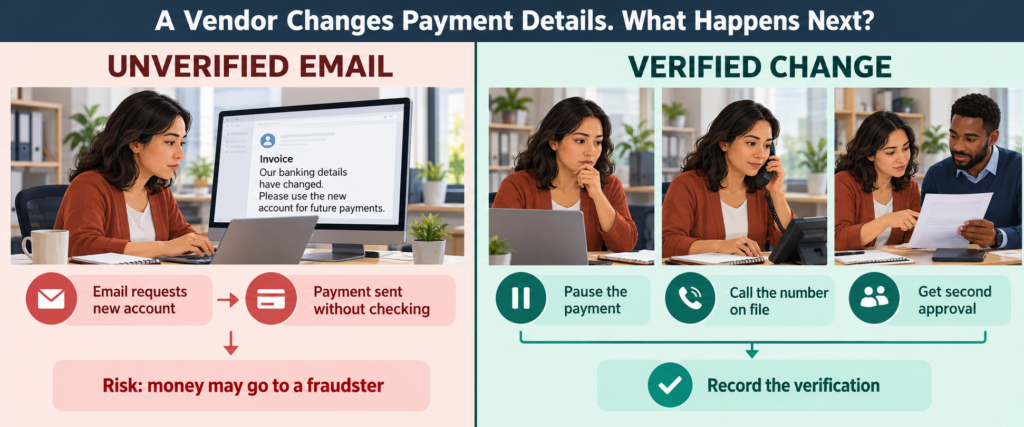
Write a rule that any new or changed banking instruction, urgent wire request, gift-card request, or payroll direct-deposit change is paused and verified through a trusted channel. Call a number already in your records, not the number in the new email or attached invoice. For larger transactions, require a second approver. Keep a record of who verified what and when. The FBI recommends secondary-channel verification for account changes. Source: FBI IC3.
Training works best when it tells staff exactly what to do: report the suspicious message, use the known phone number, and expect support rather than blame for raising a concern. Simulations can reinforce the process, but the success measure is whether people report and verify real requests promptly.
5. Back up for a business outcome, then prove restoration
“We have backups” is only the beginning. Ask five questions:
- Which critical data and systems are covered, including cloud applications?
- How often are copies made, and how much work could we lose between copies?
- Are copies protected from deletion or encryption by a compromised administrator?
- Who can restore them, and in what order?
- When did we last restore representative data and an essential workflow successfully?
Set two targets with each process owner: recovery point objective (RPO), the maximum acceptable data loss measured in time, and recovery time objective (RTO), the target time to restore the process. For example, if an accounting team can tolerate at most four hours of missing entries and one business day without its system, the backup schedule and recovery design must be tested against those targets. These are planning targets, not guarantees.
A file appearing in a backup console does not prove that permissions, databases, application dependencies, and staff access will work after restoration. Test a realistic restore. Document what succeeded, what failed, how long it took, and what changes are needed. CISA recommends backing up business data as part of its small-business security guidance. Source: CISA.
6. Detect trouble and rehearse your first hour
Choose alerts someone will actually review: suspicious sign-ins, new administrator accounts, unusual mailbox forwarding, disabled protection, endpoint detections, unexpected data sharing, failed backups, and critical devices that stop reporting. Decide who receives them, during what hours, and what the escalation path is. Logs stored without a review owner are weak evidence of detection.
Create short playbooks for the incidents most likely to disrupt your company: a compromised email account, fraudulent payment request, lost laptop, ransomware warning, and exposed customer data. A practical first-hour card can say:
- Report and preserve: record what was observed and when; save messages and relevant logs. Staff should use the designated phone number or channel if email may be compromised.
- Contain with technical help: isolate affected devices or accounts, revoke suspicious sessions, and protect backups. Avoid wiping evidence or reconnecting systems blindly.
- Mobilize: alert the incident lead, technical responder, leadership, insurer, legal counsel, and affected vendor or bank as the situation warrants.
- Assess: determine which accounts, systems, data, and transactions may be involved; document uncertainty rather than guessing.
- Restore and communicate: recover in a deliberate order, verify integrity, and follow applicable notification requirements.
If money was misdirected, call the originating bank immediately to seek recall or reversal and report the matter to IC3. For a possible personal-data breach, the FTC's response guide recommends securing operations, engaging appropriate experts, identifying what happened, and determining whom the law requires you to notify. Exact duties and timing depend on the facts and jurisdiction; engage qualified counsel rather than assuming one nationwide deadline.
7. Treat compliance as a set of obligations you can demonstrate
There is no single universal “small business cybersecurity compliance” certificate. Requirements depend on the information you handle, the services you provide, contracts, insurers, and applicable laws. A healthcare organization, a card-accepting retailer, and a federal contractor may face different obligations. A framework such as NIST CSF helps organize controls, but it does not replace sector-specific requirements or legal advice.
Create an obligations register with four columns: requirement, source, responsible owner, and evidence. Include contracts with customers, vendor security clauses, insurance conditions, retention rules, training, access reviews, risk assessments, incident reporting, and required testing. Attach evidence such as dated policies, approval records, MFA coverage, restore results, patch exceptions, and response exercise notes. Keep it current when systems, customers, or regulations change.
This leads to a useful distinction: a control is the action; evidence shows it happened; a review shows it still works. A written backup policy is weaker than a successful, documented restore. A staff-training certificate is weaker than a payment-change process that people follow when a convincing request arrives.
Also Read: Business Technology Consulting
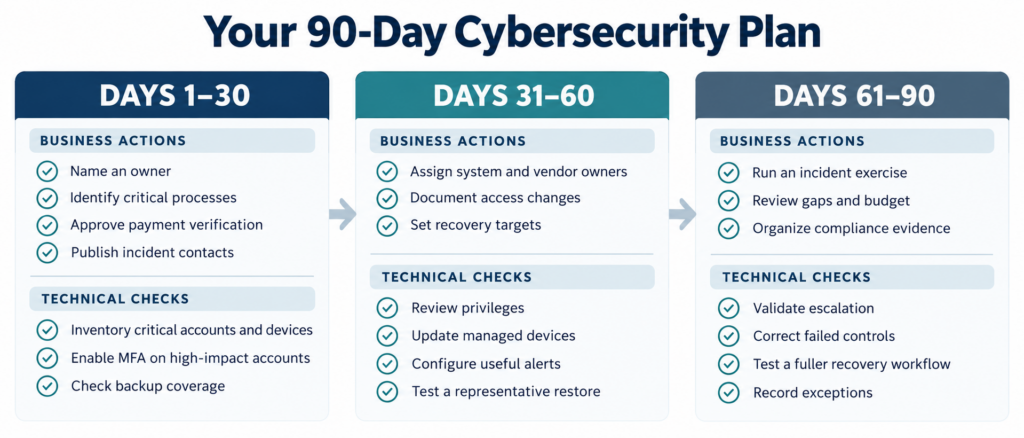
A realistic 30/60/90-day cybersecurity plan
The order below is a starting point. A company with an active incident, unusual regulatory obligations, or a critical unsupported system may need a different order.
| Window | Leadership and operations | Technical verification |
|---|---|---|
| Days 1–30 | Name an owner; identify critical processes and data; approve payment-change verification; publish the incident contact list. | Inventory critical accounts and devices; protect email/admin/finance with MFA; check backup coverage and recent results; address exposed or unsupported high-risk access. |
| Days 31–60 | Assign system and vendor owners; document access changes; define RPO/RTO for essential processes. | Review privileges and former-user access; bring devices into management; patch priority systems; configure useful alerts; test a representative restore. |
| Days 61–90 | Run a tabletop exercise with executives, office staff, and IT; review gaps and budget; map contractual or regulatory evidence. | Validate escalation; correct failed controls; test a more complete recovery workflow; record exceptions and owners. |
At each monthly review, ask: Which critical accounts lack MFA? Which devices are missing or overdue for updates? Did backups complete and did the last restore work? Which alerts were investigated? Which access exceptions remain open? These questions are more useful than a single opaque “security score.”
When outside cybersecurity support makes sense
An internal team can own much of this work, but outside help becomes valuable when no one has time to monitor alerts, the network or cloud environment has grown piecemeal, compliance evidence is scattered, or recovery has never been tested. Ask a potential provider who owns each control, how incidents are escalated, what is monitored and when, which backups are included, how restore tests are documented, and what remains your company's responsibility.
An assessment should produce a prioritized action list tied to business impact, an owner, and a target date. It should explain dependencies and tradeoffs. The most expensive tool is not necessarily the first useful move; an unprotected administrator account or an unverified payment workflow may deserve immediate attention.
NetTech works with small and mid-sized organizations on cybersecurity assessments and layered protection, alongside managed IT support, network, cloud, and remote-work systems, and business technology consulting. Its approach starts with the way a business operates, then aligns safeguards with that environment. Source: NetTech.
Small business cybersecurity FAQs
1. What is the first cybersecurity step for a small business?
Name a decision owner and list the critical accounts, systems, sensitive data, and people who administer them. Then secure high-impact accounts with MFA and check whether essential data can actually be restored.
2. Is antivirus enough for a small business?
No. Endpoint protection helps with some threats, but it cannot enforce a payment-verification rule, remove a former employee's access, or guarantee a usable backup. Combine identity, device, workflow, monitoring, and recovery controls.
3. Which accounts should have MFA?
Start with email, administrators, banking, accounting, payroll, remote access, and password managers; extend it to all supported business accounts. Review alternate login and recovery paths too.
4. Are cloud files automatically backed up?
Do not assume so. Cloud providers offer different retention and recovery features, and coverage can vary by service and configuration. Confirm what is protected, against which failure or deletion scenarios, and test a restore.
5. How often should a business test backups?
Choose a schedule based on how often systems change and how much downtime and data loss the business can tolerate. Test representative files and essential applications, document outcomes, and repeat after major changes.
6. What is business email compromise?
It is fraud involving deceptive or compromised business communications, often aimed at changing payment instructions or obtaining funds. Verify account changes through a separately established contact channel and act quickly with your bank if money is sent.
7. Does NIST CSF 2.0 make us compliant?
No. It helps structure cybersecurity risk management. Compliance depends on applicable laws, contracts, and sector rules, plus whether your organization implements and documents the required controls.
8. What should employees do after clicking a suspicious link?
Report it immediately through the designated channel and describe what happened. If credentials were entered or a file opened, tell the responder. Quick reporting lets the technical team assess and contain possible misuse; staff should not quietly delete evidence.
9. What should be in a small-business incident response plan?
A named decision lead, trusted contacts, reporting instructions, first steps for common scenarios, technical and legal escalation, bank and insurer contacts, communications ownership, and the order for restoring essential operations. Rehearse it.
10. When should we request a cybersecurity assessment?
Request one when you cannot confidently answer who has access, which systems are monitored, whether critical backups restore, or what happens during an incident. It is also sensible after rapid growth, a major cloud migration, a new compliance obligation, or a significant vendor change.

What to do next
Pick one critical workflow—payroll, customer service, order processing, or invoicing—and trace the accounts, devices, data, vendors, and people it depends on. Check its MFA, access, payment approvals, monitoring, and recovery evidence. That exercise will reveal a practical first set of improvements and give leadership a way to fund them in order.
Schedule a NetTech cybersecurity risk assessment to review the gaps, prioritize actions, and build a plan that fits your business today.