
Your Business Network Is Infrastructure, Not Just Wi-Fi
Most employees rarely think about the company network when it is working correctly.
They open their laptops.
Email loads.
Cloud applications connect.
Files synchronize.
Phones work.
Video meetings start.
Printers respond.
Remote employees connect.
Customers use guest Wi-Fi.
Business continues.
The network becomes visible only when something stops working.
Then suddenly:
“Why is the internet slow?”
“Why does Wi-Fi drop in the conference room?”
“Why can't I reach the server?”
“Why is Teams freezing?”
“Why does the VPN keep disconnecting?”
“Why can the guest network see this printer?”
“Why did the entire office go offline when one device failed?”
These may sound like separate technical problems.
Often, they are symptoms of a larger issue:
The network was accumulated rather than designed.
A router was installed when the company had eight employees.
An inexpensive switch was added when more ports were needed.
A wireless extender solved a dead spot.
Another access point was installed after the company expanded.
A second internet connection arrived but was never configured for failover.
Remote access was added quickly.
Cloud applications multiplied.
Eventually, the company may have plenty of networking equipment without having a coherent network architecture.
That distinction matters.
Managed IT Support
What Is Business Network Design?
Business network design is the process of determining how users, devices, applications, locations, cloud services, and internet resources should connect reliably and securely.
It encompasses more than hardware.
A network design may address:
- internet connectivity,
- firewalls,
- routers,
- switches,
- Ethernet cabling,
- wireless access points,
- Wi-Fi coverage,
- VLANs,
- segmentation,
- servers,
- cloud applications,
- remote access,
- VPN or newer access models,
- bandwidth,
- redundancy,
- monitoring,
- security,
- documentation,
- and future capacity.
The goal is not to create the most technologically impressive network possible.
It is to create the appropriate network for the business.
Start With the Business, Not the Equipment
One of the most common network-design mistakes occurs before a single device is purchased.
The conversation begins with:
“Which firewall should we buy?”
or:
“How many access points do we need?”
Those are implementation questions.
First come the business questions.
How many people use the network?
Consider current employees as well as expected growth.
Where do they work?
One office? Multiple offices? Home? Customer locations? A hybrid environment?
What devices connect?
Computers, phones, tablets, printers, cameras, VoIP phones, building controls, specialized equipment, guest devices, and Internet of Things devices may have different requirements.
Which applications are critical?
Cloud applications, file servers, accounting software, VoIP, video conferencing, industry platforms, and databases create different traffic patterns.
What happens if connectivity fails?
Can employees continue working?
For how long?
How sensitive is the information?
Different users and systems may require different levels of isolation and access.
How much growth is expected?
A network designed precisely for today's needs can become tomorrow's bottleneck.
That leads to the first NETTECH network-design principle:
Network architecture should follow business requirements. Hardware should follow network architecture.
Business Technology Consulting
The Seven Layers of a Strong Business Network
A useful way to evaluate a business network is through seven interconnected layers:
- Internet Connectivity
- Firewall & Security
- Switching & Wired Infrastructure
- Business Wi-Fi
- Segmentation & Access
- Cloud & Remote Connectivity
- Monitoring, Redundancy & Management
A weakness in one layer can affect the others.
A high-performance wireless system cannot compensate for an inadequate internet circuit.
A fast internet connection cannot compensate for an overloaded switch.
A sophisticated firewall cannot fully compensate for poor access management.
That is why network problems should be diagnosed as systems—not isolated devices.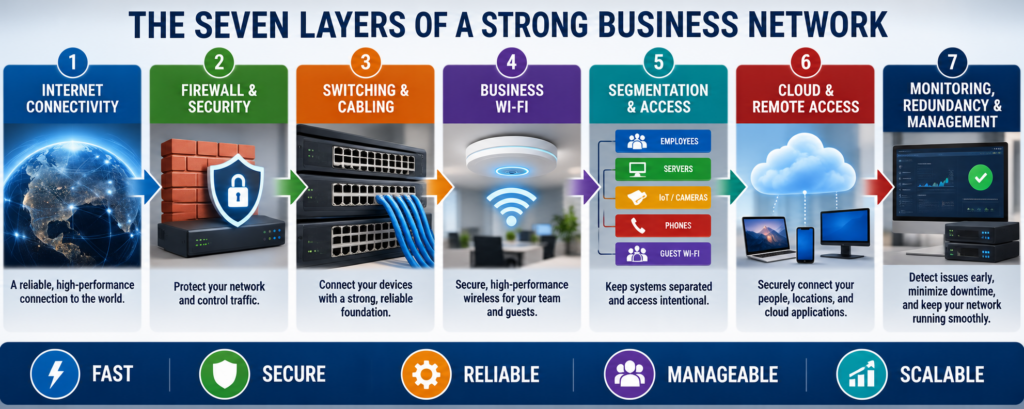
1. Internet Connectivity: Speed Is Only One Part of the Equation
Businesses often evaluate internet service almost entirely by advertised download speed.
That is incomplete.
The connection should be evaluated based on:
Download bandwidth — how quickly information reaches the business.
Upload bandwidth — increasingly important for cloud services, video conferencing, file transfers, backups, and hosted applications.
Latency — how long data takes to travel between points.
Packet loss — missing data packets can affect calls, meetings, and application performance.
Jitter — inconsistent packet timing can disrupt real-time communications.
Reliability — how consistently the circuit performs.
Service expectations — business-class connections may provide different support and service commitments.
Redundancy — whether another path exists when the primary connection fails.
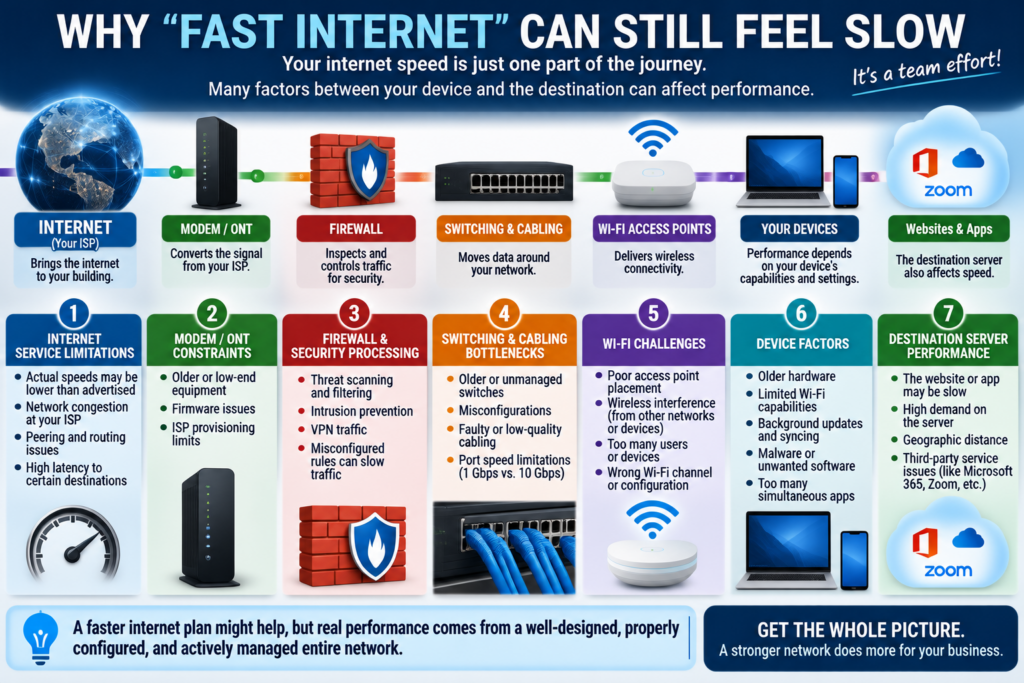
This explains a common mystery:
A business can have a “fast” internet plan and still experience poor network performance.
Bandwidth is only one variable.
2. Firewalls: Control the Boundary Between Networks
A business firewall helps control traffic entering and leaving the environment.
But simply owning one is not enough.
Configuration matters.
Updates matter.
Rules matter.
Administrative access matters.
Monitoring matters.
Lifecycle matters.
NIST's small-business security guidance emphasizes the importance of network firewalls and maintaining current, vendor-supported firewall technology.
Depending on the organization, a business firewall may provide capabilities such as:
- traffic filtering,
- intrusion prevention,
- VPN services,
- application controls,
- network segmentation,
- logging,
- content filtering,
- and threat protection.
The correct configuration should reflect the company's risk and operating requirements rather than enabling every available feature simply because it exists.
Cybersecurity
3. Switches and Wired Infrastructure: The Part Employees Rarely See
Switches form the internal transportation system for much of a wired business network.
They connect devices such as:
workstations,
servers,
wireless access points,
phones,
printers,
cameras,
and other infrastructure.
Business-grade managed switches can also provide capabilities important to network design, including:
- VLANs,
- traffic management,
- monitoring,
- port controls,
- Power over Ethernet,
- redundancy features,
- and centralized configuration.
Cabling Still Matters
Wireless networking has not eliminated wired infrastructure.
Access points themselves generally need wired connections.
So do many phones, servers, cameras, printers, workstations, and network appliances.
Poorly planned cabling can create:
unnecessary bottlenecks,
unreliable connections,
difficult troubleshooting,
and expensive future changes.
The network is only as reliable as the physical infrastructure underneath it.
4. Business Wi-Fi Should Be Designed, Not Guessed
Wi-Fi is one of the most visible parts of a business network—and one of the most commonly misunderstood.
The instinct is often:
Weak signal? Add another access point.
But wireless performance depends on more than signal strength.
A professional wireless design should consider:
- building size,
- construction materials,
- floor plan,
- user density,
- device density,
- interference,
- access-point placement,
- channel planning,
- transmit power,
- roaming,
- application requirements,
- and expected growth.
NIST notes that WLAN security depends on securing wireless components throughout their lifecycle—from initial design and deployment through ongoing maintenance and monitoring.
Coverage Is Not the Same as Capacity
This is one of the most important Wi-Fi concepts for business leaders.
A conference room may have excellent signal strength but poor performance when 40 people connect simultaneously.
Why?
Because coverage asks whether the signal reaches the room.
Capacity asks whether the network can adequately serve the devices using it.
A good wireless design addresses both.
5. Separate Guest Wi-Fi From the Business Network
Visitors need internet access.
They generally do not need access to internal business resources.
Guest wireless should therefore be logically separated from trusted business systems.
NIST's small-business guidance specifically recommends separating customer wireless internet access from the business network.
That simple example introduces a much larger network-design concept:
Segmentation
Not everything connected to a business network should necessarily be able to communicate freely with everything else.
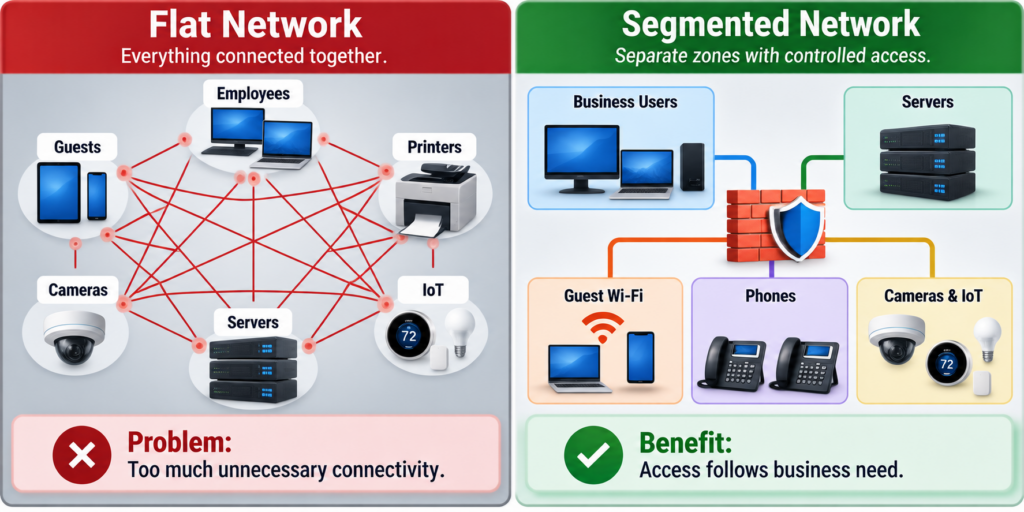
What Is Network Segmentation?
Network segmentation divides a larger network into smaller logical areas based on function, security requirements, or access needs.
For example, a business might separate:
Employee Devices
Servers
Guest Wi-Fi
VoIP Phones
Security Cameras
Printers
Building or IoT Devices
Administrative Systems
The exact design depends on the organization.
The important idea is:
Connectivity should be intentional rather than unlimited by default.
NIST describes security segmentation as grouping assets according to communication and security requirements. It notes that segmentation can help organizations manage asset inventory, privileged access, remote access, network visibility, and resilience.
What Is a VLAN?
A Virtual Local Area Network, or VLAN, is one common technology used to logically separate devices even when they share physical network infrastructure.
Imagine an office where employees, guests, phones, and security cameras all connect through the same switching infrastructure.
VLANs can help create separate logical networks for those groups.
But VLANs alone do not create a complete security strategy.
Rules governing traffic between those networks still need to be intentionally designed and enforced.
That distinction matters.
Creating separate lanes is useful.
Deciding who is allowed to cross between them is what makes the architecture meaningful.
6. Cloud Computing Changed What “The Network” Means
Traditional business networking was comparatively easy to visualize.
Employees sat inside an office.
Servers sat inside the building.
The firewall formed a clear boundary.
The internet existed outside it.
That model has changed.
Today an employee may sit at home using:
Microsoft 365,
a cloud CRM,
a hosted accounting platform,
cloud file storage,
VoIP,
and a browser-based line-of-business application.
None of those resources may physically reside in the company's office.
NIST notes that the proliferation of cloud services and geographically distributed IT resources has weakened the traditional concept of a single enterprise network perimeter.
So modern network design has to think beyond:
“How do we connect everything inside the building?”
It must also ask:
“How do users securely and reliably reach the resources they need wherever those resources live?”
IT Services
7. Remote Access Must Be Designed as Part of the Network
Remote work should not be treated as an exception anymore.
Employees, contractors, vendors, and technology providers may all need legitimate remote access.
That access needs controls.
NIST's remote-access guidance recommends that organizations secure remote-access technologies and the devices using them against expected threats, while establishing appropriate security policies.
CISA guidance also recommends MFA for remote access and highlights segmentation and monitoring as important controls around remote-access software.
Depending on the environment, remote connectivity might involve:
- VPN,
- zero-trust network access,
- secure cloud access,
- remote desktop infrastructure,
- managed remote-access tools,
- or application-specific access.
The correct solution depends on what users actually need.
Business Technology Consulting
VPN vs. Zero Trust: Does Every Business Need to Change?
VPNs remain useful.
But modern security architecture increasingly questions the assumption that a successful connection should automatically provide broad access to an internal network.
Zero Trust approaches instead focus on verifying access based on factors such as identity, device, context, and the specific resource being requested.
This does not mean every small business should immediately abandon its VPN.
It means network access should be evaluated based on:
Who is connecting?
From what device?
To which resource?
Why do they need access?
How much access is actually necessary?
NIST's secure-enterprise-network guidance discusses zero-trust network access and microsegmentation among modern approaches responding to today's more distributed network landscape.
The principle is more important than the buzzword:
Access should be appropriate to the user and task—not automatically broad because someone successfully connected.
Reliability: What Happens When Something Fails?
Every network eventually experiences failure.
An internet provider has an outage.
A firewall fails.
A switch loses power.
A cable is damaged.
An access point stops functioning.
A cloud service becomes unavailable.
Good network design does not assume failure will never happen.
It asks:
What happens when it does?
Internet Redundancy
For a company that depends heavily on cloud applications, internet connectivity may be as operationally important as electricity.
A secondary internet connection can reduce the impact of a primary-provider outage.
But redundancy should be properly designed.
Ask:
- Is the second circuit from a genuinely independent provider?
- Does it use a different physical path where possible?
- Will the firewall fail over automatically?
- Which applications should continue operating?
- Has failover been tested?
- Will inbound services still work?
- Is the backup connection large enough for critical operations?
Simply paying for two internet connections does not automatically create effective redundancy.
Power Is Part of Network Reliability
A business can have two internet providers and still lose connectivity if the firewall and switches shut down during a short power interruption.
Critical network equipment may benefit from properly sized uninterruptible power supplies (UPS).
This illustrates a larger principle:
Network resilience is a chain.
The business is only protected from the failures the architecture has actually considered.
How Much Redundancy Does a Small Business Need?
Not every business needs duplicate everything.
Redundancy has a cost.
The correct decision should be based on the cost of downtime.
Consider two companies.
Company A
Ten employees use mostly local applications. Internet downtime is inconvenient but manageable for several hours.
Company B
Sixty employees rely almost entirely on cloud applications and VoIP phones. Without internet access, most employees cannot perform meaningful work.
The value of redundant connectivity is very different.
This is why NETTECH's network planning should begin with:
What does downtime mean to the business?
Then design resilience accordingly.
Network Monitoring: Know About Problems Before Employees Report Them
A mature network should not rely entirely on employees to serve as monitoring tools.
Without monitoring, the first alert may be:
“The internet seems slow.”
Professional network management can provide visibility into:
- device availability,
- internet connectivity,
- bandwidth utilization,
- switch status,
- wireless access points,
- interface errors,
- device health,
- configuration changes,
- security events,
- and capacity trends.
Monitoring does not eliminate problems.
It improves visibility.
That distinction matters because invisible problems can continue until they become disruptive.
Documentation: The Most Underrated Part of Network Design
A network that only one person understands is a business risk.
Documentation may include:
- network diagrams,
- equipment inventory,
- IP addressing,
- VLAN design,
- firewall rules,
- internet circuits,
- wireless infrastructure,
- vendor information,
- warranty information,
- administrative ownership,
- remote-access architecture,
- backup configurations,
- and lifecycle dates.
Documentation improves troubleshooting.
It also improves planning.
And when an employee or technology provider changes, the company does not have to rediscover its own network from scratch.
Business Network Security: Architecture Matters
Cybersecurity is not a separate box that gets added after network design is finished.
Security should influence the architecture from the beginning.
Consider:
Segmentation
Should guest devices reach internal systems?
Administrative Access
Who can configure firewalls, switches, and access points?
Remote Access
How are employees and vendors authenticated?
Firmware and Updates
Are network devices supported and maintained?
Monitoring
Would suspicious network behavior be noticed?
Lifecycle
Is the equipment still receiving security updates?
Configuration
Are unnecessary services enabled?
Physical Security
Can unauthorized people access critical network hardware?
Network security is not one feature.
It is the cumulative result of many design decisions.
About Nettech
The Hidden Problem: Shadow IT and Unknown Devices
Growing businesses often have more technology connected than leadership realizes.
An employee installs a wireless printer.
A department buys an internet-connected device.
A vendor installs a controller.
Someone adds an inexpensive switch.
An old access point remains active.
A former application is still connected.
These devices may function perfectly.
The problem is visibility.
You cannot effectively manage a network you do not understand.
Asset discovery and documentation should therefore be part of ongoing network management—not merely something performed during initial installation.
How to Know When Your Business Network Needs an Upgrade
A network upgrade should not be triggered simply because newer equipment exists.
Look for business and technical signals.
Frequent Wi-Fi Complaints
Dead zones, unstable roaming, or congestion may indicate design or capacity problems.
Slow Cloud Applications
The cause may involve internet service, Wi-Fi, switching, DNS, device performance, or application issues.
Growing Employee Count
Infrastructure designed for 15 employees may struggle when 50 people and hundreds of devices are connected.
Unsupported Equipment
Technology that no longer receives appropriate updates or vendor support deserves attention even if it still powers on.
Flat Network Architecture
Employees, guests, cameras, printers, and other devices may all share unnecessary access.
Remote-Access Problems
Frequent disconnections or overly broad access may justify redesign.
Single Points of Failure
One internet circuit, one critical switch, or one power source may create unacceptable operational risk.
Poor Documentation
If nobody can explain how the network is configured, that itself is a management problem.
Business Change
A move, acquisition, second office, major cloud migration, new phone system, or significant hiring may justify redesign even when the current network is technically functioning.
Resources & Blog Posts
Myth vs. Reality: Business Network Design
Myth: Faster internet fixes a slow network.
Reality: Internet bandwidth is only one part of performance. Wi-Fi, switches, cabling, device performance, latency, applications, and configuration can all create bottlenecks.
Myth: More Wi-Fi access points always improve coverage.
Reality: Poor placement, interference, channel overlap, and excessive access-point density can reduce wireless performance.
Myth: If devices can connect, the network is working properly.
Reality: Connectivity does not prove reliability, security, capacity, or appropriate architecture.
Myth: Small businesses do not need network segmentation.
Reality: Even smaller organizations may benefit from separating guest access, business systems, cameras, IoT devices, and other technology according to actual risk and access needs.
Myth: Moving to the cloud eliminates network infrastructure.
Reality: Cloud adoption often makes dependable connectivity even more important because employees must reach applications and data over the network.
Myth: Network security is mainly a firewall.
Reality: Security depends on architecture, access, segmentation, device configuration, patching, monitoring, remote access, and lifecycle management as well as firewall controls.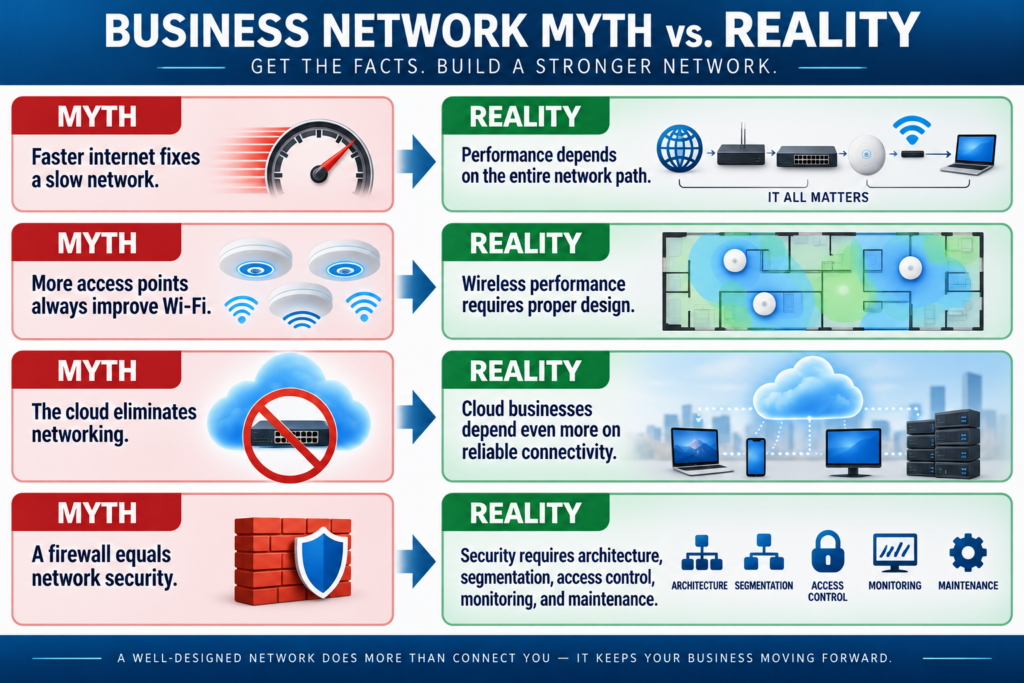
The NETTECH Business Network Health Test
Business leaders do not need to understand every protocol to ask useful questions.
Evaluate these seven areas.
| Area | Leadership Question |
|---|---|
| Performance | Do employees consistently get the connectivity they need? |
| Reliability | What happens when our internet or critical equipment fails? |
| Security | Are access and network boundaries intentionally controlled? |
| Wi-Fi | Was wireless designed for our building, users, and device density? |
| Remote Access | Can employees and vendors connect securely without unnecessary access? |
| Visibility | Are network health, capacity, and important events monitored? |
| Scalability | Can the network support where the business is going next? |
If leadership cannot confidently answer several of these questions, the next step may not be new hardware.
It may be a network assessment.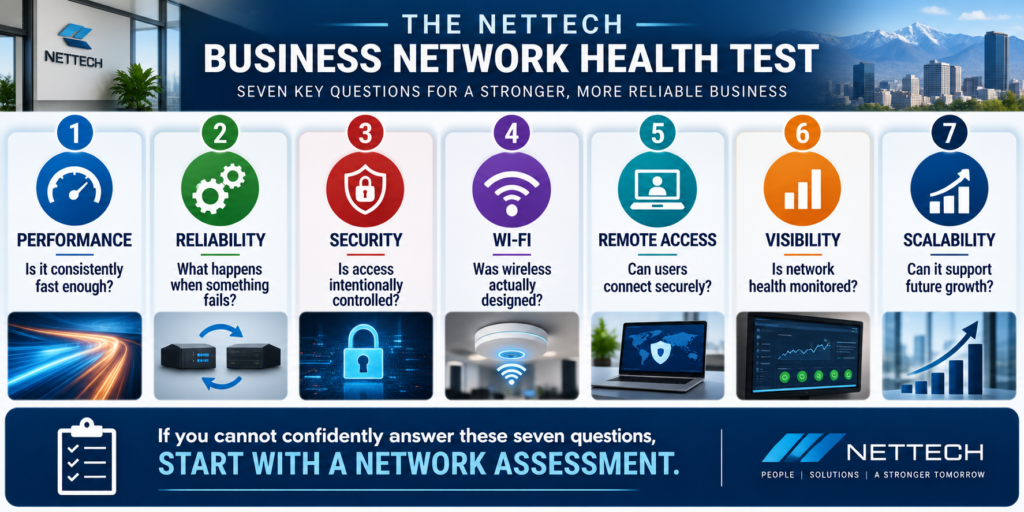
How to Plan a Business Network Upgrade
Do not begin with a shopping list.
Use a structured process.
Step 1 — Document the Current Environment
Identify:
users,
devices,
applications,
network hardware,
internet services,
Wi-Fi,
remote access,
cloud dependencies,
and critical business systems.
Step 2 — Identify Business Requirements
Determine what must work, for whom, from where, and how reliably.
Step 3 — Identify Bottlenecks and Risk
Look for:
performance issues,
coverage problems,
unsupported equipment,
single points of failure,
poor segmentation,
remote-access weaknesses,
and insufficient capacity.
Step 4 — Design the Target Architecture
Determine how the network should operate after the upgrade.
Do this before choosing hardware.
Step 5 — Create an Implementation Plan
A network upgrade can itself disrupt operations.
Plan migration, testing, rollback, communication, and timing.
Step 6 — Document the Finished Environment
The final network should not exist only in an engineer's memory.
Step 7 — Monitor and Review
Network design is not permanent.
Business requirements change.
The architecture should be reviewed as the company grows.
How Should a Growing Business Choose Network Equipment?
Do not choose solely by brand or maximum advertised speed.
Evaluate equipment based on:
Capacity
Can it support expected users, devices, and traffic?
Manageability
Can it be monitored and configured effectively?
Security
Does it support the controls the architecture requires?
Support Lifecycle
Will the vendor continue providing appropriate updates and support?
Integration
Does it work appropriately with the rest of the environment?
Redundancy
Does it support the availability requirements of the business?
Scalability
Can the environment grow without replacing everything?
Total Cost of Ownership
Purchase price is only part of cost. Management, licensing, support, replacement, downtime, and operational complexity matter too.
The best device is not necessarily the one with the longest specification sheet.
It is the one that appropriately fulfills its role in the architecture.
How Should a Business Choose a Network Partner?
A good network provider should ask about the business before recommending equipment.
Ask potential partners:
How do you assess our current network?
Look for more than a hardware inventory.
How do you determine Wi-Fi requirements?
Coverage, capacity, interference, construction, users, and devices should matter.
How do you approach network security?
Ask about segmentation, administrative access, firewall configuration, remote access, monitoring, and lifecycle management.
How do you design for downtime?
The provider should understand the operational consequences of failure.
How do you plan for growth?
A network should not become obsolete immediately after installation.
Will the environment be documented?
The answer should be yes.
What happens after implementation?
Networks require monitoring, updates, review, and ongoing management.
A provider that begins with a product list before understanding your operations may be solving a hardware problem.
NETTECH's opportunity is to solve the business infrastructure problem.
Contact
Frequently Asked Questions About Business Network Design
What is business network design?
Business network design is the process of planning how employees, devices, applications, offices, cloud services, and internet resources connect. It includes decisions about internet service, firewalls, switches, Wi-Fi, cabling, segmentation, remote access, security, monitoring, redundancy, and future capacity.
What equipment does a small business network need?
Requirements vary, but many business networks use an internet connection, business firewall or security gateway, managed switches, wireless access points, structured cabling, and power protection. Additional equipment and services depend on the organization's size, applications, locations, security requirements, and availability needs.
How is business Wi-Fi different from home Wi-Fi?
Business Wi-Fi typically needs to support more users and devices, centralized management, multiple access points, guest networks, stronger access controls, monitoring, roaming, and more deliberate capacity and coverage planning.
What is network segmentation?
Network segmentation separates devices or systems into logical groups based on function, security, or access requirements. It can help limit unnecessary communication between areas such as employee systems, guests, servers, cameras, and IoT devices.
What is a VLAN?
A VLAN, or Virtual Local Area Network, allows devices to be logically grouped into separate networks even when they share physical switching infrastructure. VLANs are commonly used as part of network segmentation.
Does faster internet improve business Wi-Fi?
It can help when internet bandwidth is the bottleneck, but it will not fix every Wi-Fi problem. Poor access-point placement, interference, congestion, cabling, switching, device limitations, and configuration can all affect performance.
Should a business have two internet connections?
It depends on the operational cost of losing internet access. Organizations that depend heavily on cloud applications, VoIP, or internet-based systems may benefit from redundant connectivity and properly configured automatic failover.
How often should a business network be upgraded?
There is no universal replacement interval. Businesses should evaluate network equipment based on support lifecycle, security updates, performance, reliability, capacity, changing business requirements, and future growth rather than age alone.
How can remote workers securely access business systems?
The appropriate solution depends on the systems involved. Options may include VPNs, zero-trust network access, secure cloud applications, managed remote-access tools, and other architectures combined with appropriate authentication, device security, access controls, and monitoring. NIST recommends securing both remote-access technologies and the devices that use them.
What are the signs a business network needs an upgrade?
Common indicators include recurring Wi-Fi problems, poor cloud application performance, unsupported equipment, increasing employee or device counts, inadequate segmentation, unreliable remote access, single points of failure, limited monitoring, and poor network documentation.
Contact

What You Should Do Next. . .
If employees are complaining about Wi-Fi, cloud applications are inconsistent, remote access feels unreliable, or nobody can clearly explain how your network is designed, do not start by buying more equipment.
Start by evaluating the environment.
Ask:
Is our network fast enough for how we work?
Is it secure enough for what we connect?
What happens when something fails?
Can it support where the business is going next?
A well-designed network should fade into the background of the workday. Employees should be able to connect, communicate, collaborate, and access the systems they need without constantly thinking about the infrastructure underneath them.
NETTECH can help evaluate your current network, identify bottlenecks and unnecessary risks, and create a practical roadmap for improving performance, security, reliability, and future capacity.