
A business rarely wakes up one morning and decides:
“We need a completely different technology operating model.”
The transition usually happens gradually.
The company hires more employees.
More applications move to the cloud.
Email becomes mission-critical.
Customer information becomes more sensitive.
Remote employees need secure access.
The network supports more devices.
Cybersecurity responsibilities grow.
Backups become more important.
A second location opens.
And the person who used to “handle the computers” suddenly finds that technology has become a full operating environment.
That is usually when businesses begin looking at managed IT services.
But the term is often misunderstood.
Managed IT is sometimes described as little more than paying a monthly fee for technical support. That definition misses most of the value.
A mature managed IT relationship is not simply about having someone available when an employee cannot log in.
It is about systematically managing the technology the business depends upon.
For NetTech, that distinction is fundamental. The company's positioning is built around business outcomes over hardware, prevention over reaction, relationships over tickets, and roadmaps over random upgrades.
So what should managed IT actually mean for a growing business?
What Are Managed IT Services?
Managed IT services are an ongoing arrangement in which an external technology provider assumes responsibility for agreed portions of a company's IT environment.
Depending on the organization and agreement, that may include:
- help-desk support,
- computers and endpoints,
- monitoring,
- patching,
- user accounts,
- onboarding and offboarding,
- servers,
- networks,
- Wi-Fi,
- cybersecurity,
- Microsoft 365,
- cloud environments,
- backups,
- recovery planning,
- vendors,
- technology documentation,
- and long-term planning.
The provider is generally called a managed service provider, or MSP.
What makes the model different from traditional break-fix IT is the word managed.
In break-fix support, the central event is usually a problem:
Something fails → someone calls → the issue is repaired.
In managed IT, work occurs even when users are not reporting problems.
Systems are maintained.
Updates are applied.
Backups are reviewed.
Risks are evaluated.
Users and devices are managed.
Recurring issues are investigated.
Infrastructure is monitored.
Future needs are discussed.
The objective is not to eliminate every technical problem—that is unrealistic.
The objective is to make the environment more predictable, supportable and resilient.
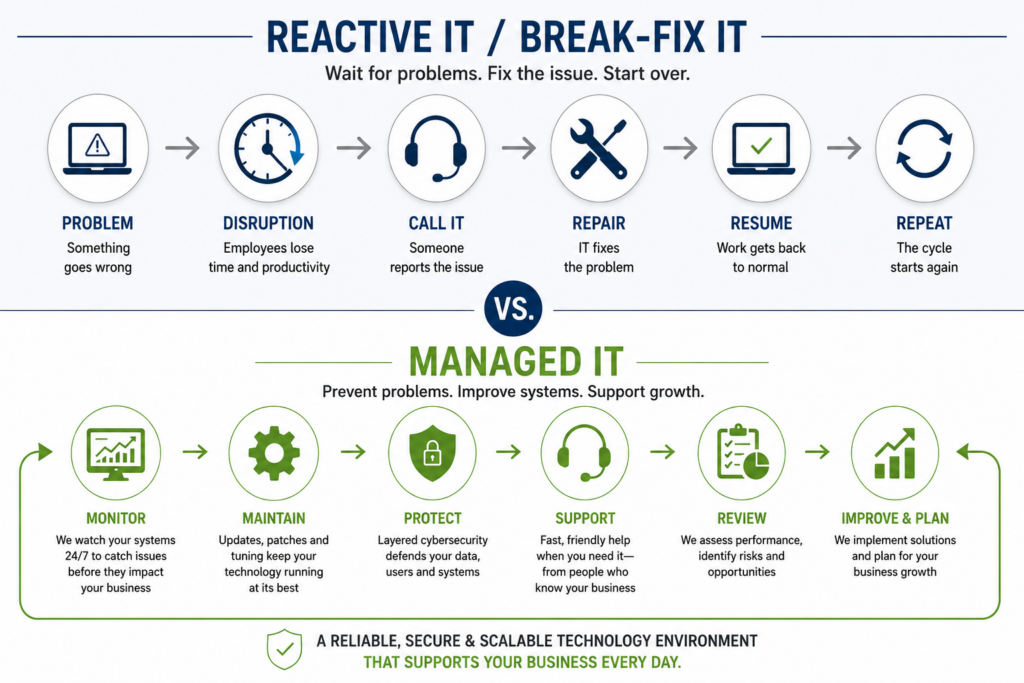
Managed IT Is an Operating Model, Not Just a Help Desk
This is the distinction many discussions of managed IT miss.
A help desk answers support requests.
Managed IT should manage the environment that generates those requests.
Imagine a 45-person professional-services firm.
Employees repeatedly complain that a shared application is slow.
A purely reactive model may troubleshoot each incident as it occurs.
A managed approach asks additional questions:
Why does the slowdown happen?
Is capacity inadequate?
Is network performance involved?
Is the server aging?
Is a software dependency causing the problem?
Does the issue occur at particular times?
Has employee growth exceeded the original design?
Is there a more appropriate long-term architecture?
The first approach restores service.
The second tries to improve the operating environment.
Both are important—but they are not the same thing.
NetTech's managed-support architecture reflects this broader model: help desk, monitoring, maintenance, patching, device and user management, onboarding and offboarding, and backup oversight are connected to the business outcomes of less downtime, more productive staff, and stable daily operations.
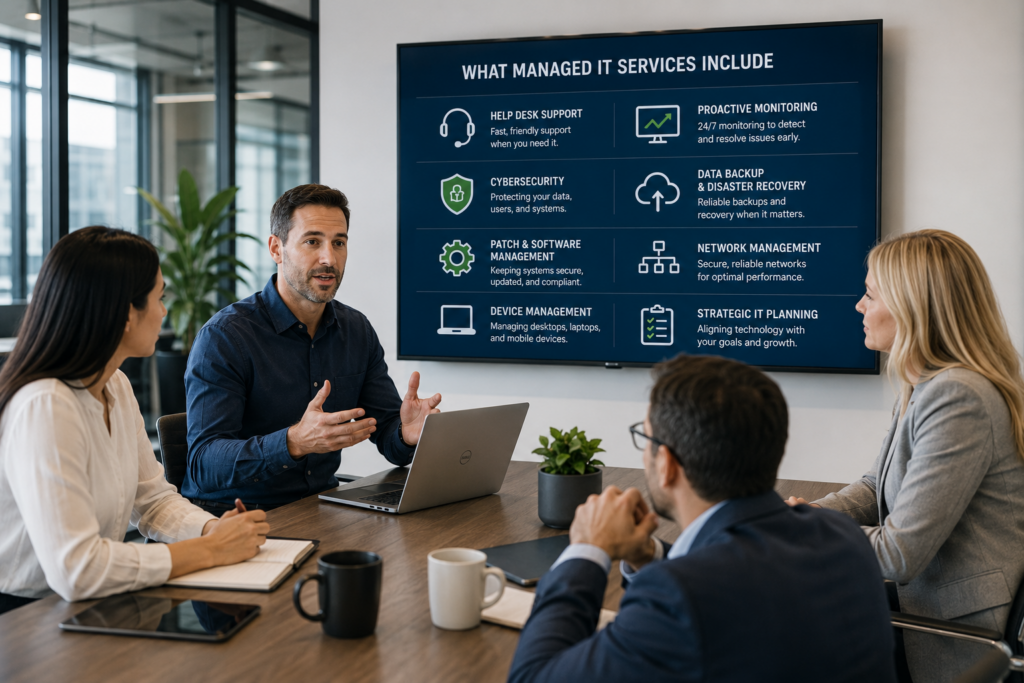
What Should Managed IT Services Include?
There is no universal package that every MSP provides.
That is why businesses should evaluate responsibilities rather than assuming the label “managed IT” guarantees a particular scope.
A mature program commonly addresses several operating layers.
User Support
Employees need a clear place to get help.
Common requests include:
password or access problems,
email issues,
software trouble,
printing,
device configuration,
account permissions,
and application support.
But the better question is not merely how quickly tickets are closed.
Leadership should also ask:
What patterns are those tickets revealing?
If 25 employees repeatedly experience the same issue, solving each request independently may be less valuable than eliminating the root cause.
Device and Endpoint Management
Every laptop, desktop and other business device creates operational and security responsibilities.
That may include:
inventory,
configuration,
software updates,
security policies,
endpoint protection,
replacement planning,
and decommissioning.
This becomes increasingly important as businesses add remote employees, mobile workers and employee-owned devices.
Microsoft, for example, emphasizes device management and security-policy enforcement as part of protecting business data across company and employee devices.
Monitoring and Preventive Maintenance
One of the defining differences between managed and reactive IT is what happens between support calls.
Monitoring may help identify conditions such as:
storage running low,
services failing,
hardware problems,
network instability,
backup failures,
or unusual system behavior.
Preventive maintenance also includes routine patching and updates.
The FTC specifically recommends that businesses maintain a schedule for updating software and operating systems and enable automatic updates where appropriate because updates can deliver important security fixes.
This is a good example of why maintenance and cybersecurity increasingly overlap.
Cybersecurity Is Part of Managed IT—but Should Not Be Treated Casually
A modern technology environment cannot separate reliability from cybersecurity.
Users, devices, networks, cloud services, identity, backups and remote access all have security implications.
The FTC's small-business cybersecurity guidance recommends practices that include MFA, software updates, access controls, monitoring, backups, employee education, incident-response planning, disaster recovery and business continuity.
That is far broader than installing antivirus software.
A capable managed IT relationship should therefore help leadership understand who is responsible for security activities such as:
identity and access,
patching,
endpoint protection,
firewall and network controls,
email protection,
employee awareness,
backup oversight,
and incident preparedness.
But there is another side to the equation.
The provider itself becomes part of the company's risk environment.
NIST notes that many SMBs use MSPs to manage IT infrastructure, cybersecurity and related operations—and that compromise of an MSP can increase risk to the businesses it supports.
That means selecting an MSP is not only a support decision.
It is also a vendor-risk decision.
Leadership should understand what access the provider has, how accounts are secured, how privileged access is controlled, and what responsibilities belong to each party.
Backup, Recovery and Business Continuity
One of the most common technology misconceptions is:
“We have backups, so we're covered.”
Backups are important.
But they are only one part of resilience.
Leadership needs to understand several separate questions:
What is being backed up?
How frequently?
Where is it stored?
Are backups protected from the production environment?
Are restores tested?
How long would recovery take?
Which systems should be restored first?
How would the business operate during the disruption?
The FTC's guidance distinguishes incident response, disaster recovery and business continuity and recommends that businesses have plans in place before an incident occurs and test them regularly.
That is why a mature managed IT program should not simply report that a backup job completed successfully.
It should help the organization understand whether it can actually recover.
Network, Cloud and Remote-Work Management
Modern businesses rarely operate within four office walls anymore.
Technology may include:
wired networks,
business Wi-Fi,
internet connections,
VPNs or secure remote access,
Microsoft 365,
cloud applications,
remote employees,
multiple locations,
and mobile devices.
These systems need to work together.
A network problem can appear to be an internet problem.
An identity issue can look like an application problem.
A remote-access problem may actually be a security-policy problem.
This is one reason fragmented technology vendors can create management difficulty: each provider sees only one piece of the operating environment.
NetTech's service model intentionally connects network infrastructure, cloud strategy, Microsoft 365 guidance, secure remote access and collaboration environments because the business outcome is not “more technology.”
It is reliable access, controlled connectivity and easier collaboration.
The Missing Layer: Technology Leadership
This is where managed IT can either become strategic—or remain a more sophisticated repair service.
Growing companies eventually face questions that cannot be solved through tickets:
Should we replace the server?
Should this system move to the cloud?
What should we budget next year?
Which technology risks deserve attention first?
When should computers be replaced?
How should a second location connect?
Are we paying for redundant software?
What will our environment need if we hire 30 more employees?
Who is coordinating vendors?
Where should AI fit into our operations?
What should our cybersecurity roadmap look like?
These are not troubleshooting questions.
They are business technology decisions.
NetTech's differentiator is specifically the combination of fractional CIO/CTO thinking with implementation and ongoing support.
That matters because managed IT works best when leadership can connect three time horizons:
Today: keep people productive.
Tomorrow: prevent and reduce known risks.
Next 12–36 months: align technology with where the business is going.
Without that third layer, companies can still end up making technology decisions one emergency or project at a time.
Four Common IT Operating Models
A useful way to understand managed IT is to compare it with the alternatives.
| Model | Primary Approach | Best Fit | Common Limitation |
|---|---|---|---|
| Break-Fix IT | Call for help after a problem | Very small/simple environments | Limited proactive management |
| Internal IT | Employees manage technology internally | Organizations with sufficient scale and expertise | Recruiting, coverage and specialty depth |
| Co-Managed IT | Internal team + outside MSP | Companies that need added expertise or capacity | Requires clear responsibilities |
| Fully Managed IT | MSP handles most agreed IT functions | SMBs without a full internal IT department | Provider selection and governance are critical |
The question is not:
“Is outsourcing better than internal IT?”
That is too simplistic.
The better question is:
“Which model gives our organization the right combination of ownership, expertise, coverage, accountability and strategic guidance?”
When Does Managed IT Make Sense?
Managed IT tends to become more valuable when technology dependence increases faster than internal technology management capability.
Consider the NetTech Managed IT Readiness Test.
Leadership should evaluate five areas:
1. Operational Dependence
Would a technology outage prevent employees from doing meaningful work?
2. Support Complexity
Are employees, managers or office staff frequently troubleshooting technology themselves?
3. Security Responsibility
Does the organization now manage sensitive data, remote access, cloud systems, cybersecurity requirements or third-party obligations?
4. Growth
Are hiring, new locations, remote teams or new applications making the environment more difficult to manage?
5. Leadership
Does anyone clearly own the 12–36 month technology roadmap?
If the answers increasingly point toward greater dependence and less clarity, managed IT may no longer be simply an IT decision.
It may be an operational-management decision.
Myth vs. Reality
Myth: Managed IT means nothing will break.
Reality: No technology provider can credibly promise zero failure or zero downtime. Managed IT should improve prevention, detection, response, maintenance and recovery—not promise perfection.
Myth: Managed IT is only for companies without internal IT.
Reality: Co-managed arrangements can strengthen an existing internal team with additional tools, specialists, monitoring, cybersecurity capabilities or project support.
Myth: The cheapest monthly MSP is the best value.
Reality: Price without scope is almost meaningless. Businesses should compare responsibility, expertise, cybersecurity, support processes, planning, escalation, documentation and strategic involvement.
Myth: Managed IT is mainly about computers.
Reality: For a growing business, IT increasingly touches productivity, customer experience, risk, communication, operations, continuity, compliance and growth.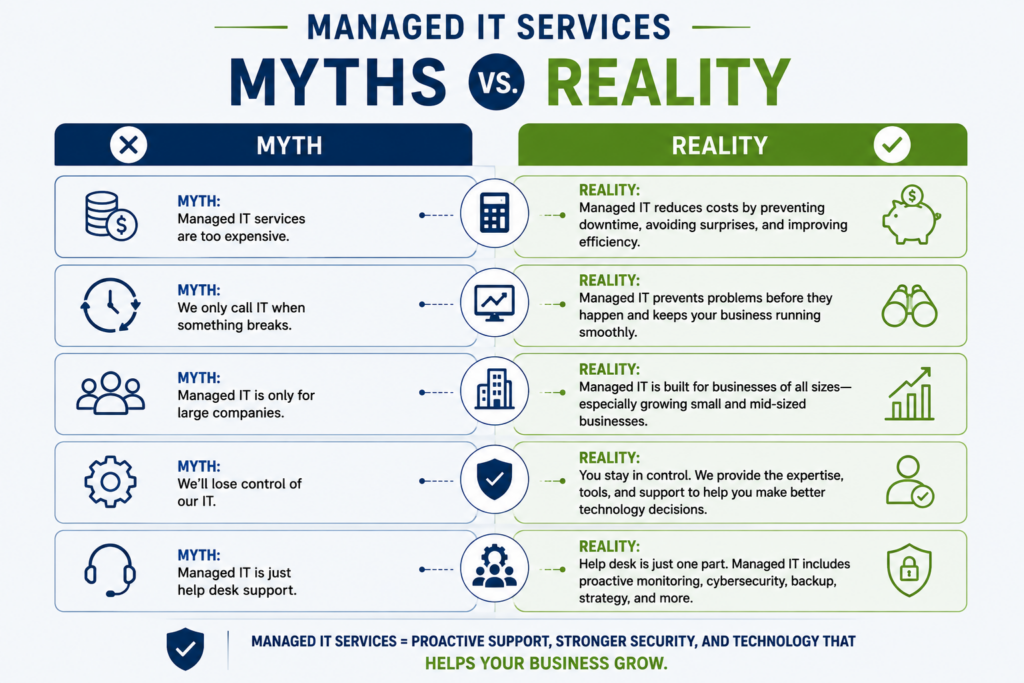
How Should a Business Evaluate a Managed IT Provider?
The most useful evaluation starts with responsibilities, not marketing claims.
Ask:
What are you actually responsible for?
Get clarity around users, endpoints, servers, networks, cloud applications, security, backups and vendors.
What happens proactively?
If almost every activity requires the client to open a ticket, the service may not be very “managed.”
How is cybersecurity handled?
Understand identity, MFA, endpoint protection, patching, network security, email security, monitoring and incident response.
How do you manage backups and recovery?
Ask how failures are detected, restores are tested and recovery responsibilities are defined.
How do you plan technology?
Look for roadmaps, lifecycle planning, budgeting, business reviews and strategic guidance.
How do you communicate?
Businesses should understand escalation, support processes, responsibilities and who owns the relationship.
How do you secure your own access?
Because MSPs can hold privileged access, provider security should be part of due diligence.
NIST specifically points out that outsourcing can make strategic sense for many SMBs, particularly when they lack the expertise or budget to maintain specialized cybersecurity capabilities internally.
But outsourcing responsibility does not mean outsourcing accountability.
Leadership still needs to understand how its technology is being governed.
The Real Business Case for Managed IT
The strongest case for managed IT is not:
“You will never have technology problems again.”
Nor is it:
“This will always cost less.”
Those claims are too broad.
The real value is better understood through five business outcomes.
Reliability
Fewer preventable interruptions and more systematic maintenance.
Productivity
Employees spend more time doing their jobs and less time troubleshooting technology.
Risk Management
Security, backup and access responsibilities become intentional rather than incidental.
Planning
Technology investments follow priorities and lifecycle needs rather than emergencies.
Scalability
The technology environment can evolve with headcount, locations, cloud adoption and operational complexity.
That is also why NetTech's client profile recommends positioning the company as a business technology leadership partner first and an IT service provider second.
The provider's real job is not simply to keep technology alive.
It is to help make technology dependable enough, secure enough, understandable enough and scalable enough to support the business.
Where Should Your Business Start?
Do not begin by asking which MSP has the longest service list.
Begin with your current environment.
Leadership should ask:
- What technology problems repeatedly consume employee or management time?
- Which systems are essential to daily operations?
- Where are our largest cybersecurity or continuity uncertainties?
- What technology is approaching the end of its useful lifecycle?
- What will change in the business over the next 12–36 months?
- Who currently owns the responsibility for connecting those answers into one technology plan?
Those questions create a much more useful conversation than:
“How much is managed IT per month?”
Price matters.
But first determine what the organization actually needs managed.
Technology Should Support the Business—Not Become Another Business Problem
Small and mid-sized businesses do not need technology for its own sake.
They need employees to work.
Customers to be served.
Information to remain protected.
Operations to continue.
Systems to recover.
Growth to be supported.
And technology decisions to make sense.
That is the real standard by which managed IT services should be evaluated.
A good managed IT relationship should reduce the amount of technology uncertainty leadership carries—not simply provide another number to call when something breaks.
At NetTech, the approach begins with the business: workflows, priorities, risk, growth and long-term goals. The technology follows from there.
If your business has reached the point where IT feels increasingly reactive, fragmented or difficult to plan, the next step does not have to be another hardware purchase or another emergency repair.
Start with a technology conversation.
NetTech can help evaluate your current environment, identify what is creating unnecessary risk or operational friction, and determine whether a managed IT model makes sense for where your business is going.
FAQs
What are managed IT services?
Managed IT services are an ongoing arrangement in which an external provider manages agreed areas of a business's technology environment. Services may include help desk, monitoring, maintenance, patching, devices, users, networks, cybersecurity, cloud systems, backups and technology planning.
What does a managed IT provider do?
A managed IT provider typically combines day-to-day support with proactive technology management. The exact scope varies, so companies should review responsibilities carefully instead of assuming all MSP agreements include the same services.
Is managed IT worth it for a small business?
It can be valuable when technology is important to operations but the organization lacks the internal time, tools or expertise to manage it comprehensively. The decision should consider downtime, security, employee productivity, continuity, growth and strategic technology needs—not monthly price alone.
What is the difference between managed IT and break-fix IT?
Break-fix support primarily responds after an issue occurs. Managed IT adds ongoing maintenance, monitoring, management and planning intended to reduce preventable disruption and improve the health of the overall technology environment.
Does managed IT include cybersecurity?
Many managed IT agreements include cybersecurity responsibilities, but the depth varies substantially. Businesses should clarify endpoint protection, patching, MFA, email security, network controls, monitoring, backup, incident response and any services that are separately scoped.
Can managed IT work with an internal IT employee?
Yes. A co-managed model allows internal IT staff and an outside provider to divide responsibilities. An MSP might supply monitoring, help desk capacity, cybersecurity expertise, cloud support or specialist resources while the internal team retains other responsibilities.
How do I choose a managed IT provider?
Evaluate responsibility, proactive management, cybersecurity practices, backup and recovery processes, communication, strategic planning, provider security, technical expertise and business understanding. The best fit is a provider that can explain not only what technology it manages, but how that management supports your organization's operations and goals.
What You Should Do Next. . .
If your business has reached the point where technology feels increasingly difficult to manage, the answer is not necessarily to buy more software, replace more equipment, or wait for the next problem to force a decision.
Start by understanding where you are today.
Look at the technology your business depends on every day. Are recurring IT problems consuming employee time? Are systems being proactively monitored and maintained? Do you know whether your backups can actually be restored? Are cybersecurity responsibilities clearly defined? Is someone planning for aging equipment, new employees, additional locations, cloud services, and the technology your business will need two or three years from now?
Most importantly, ask one simple question:
Is our technology being actively managed—or are we still mostly reacting to it?
If the answer is unclear, that is a good place to begin.
Managed IT services should not add another layer of complexity to your business. Done well, they should do the opposite. They should give your employees dependable support, reduce preventable disruption, strengthen cybersecurity, improve visibility into your technology environment, and give leadership a clearer path for making technology decisions.
You also do not need to know exactly what services you need before speaking with an IT provider. A good technology partner should help you determine that. The conversation should begin with your business—how your people work, where technology creates friction, what risks concern you, what systems are critical, and where the organization is headed.
That is the approach NETTECH takes.
Rather than recommending technology simply because it is available, NETTECH helps businesses evaluate their current environment, identify meaningful priorities, and develop a practical technology strategy around reliability, security, productivity, continuity, and growth.
If your current IT approach is creating more questions than confidence, schedule a technology conversation with NETTECH.
You will come away with a clearer understanding of where your technology stands, what deserves attention, and what your next steps should be—without the guesswork.
Better technology starts with a better understanding of your business.