
Technology should help your business operate smoothly, serve customers, protect information, and grow. Yet for many small and mid-sized businesses, technology has evolved without a clear plan.
A few computers became dozens. One office expanded into multiple locations. Cloud applications were added one at a time. Remote employees began connecting from home. Different vendors were hired for internet service, software, phones, printers, cybersecurity, and backups—but no one assumed responsibility for how everything worked together.
Eventually, the cracks begin to show:
- Employees repeatedly lose access to files or applications.
- Computers become slow or unreliable.
- Software updates interrupt important work.
- Wi-Fi works in some areas but not others.
- Former employees retain access longer than they should.
- Backups exist, but no one is certain they can be restored.
- Cybersecurity tools generate alerts that nobody regularly reviews.
- Technology decisions are made only when something breaks.
- An office manager or knowledgeable employee becomes the unofficial IT department.
Managed IT services are designed to replace this reactive, fragmented approach with ongoing technology management, user support, security oversight, and strategic planning.
For small and mid-sized businesses, the most valuable managed IT provider is not simply a company that closes support tickets. It is a technology partner that understands how the business operates, identifies risks before they become emergencies, and helps leadership make better long-term decisions.
What Are Managed IT Services?
Managed IT services are ongoing technology support and management provided by an outside IT company, commonly called a managed service provider, or MSP.
Instead of contacting a technician only after something breaks, the business enters into a continuing relationship with a provider that helps monitor, maintain, secure, support, and improve its technology environment.
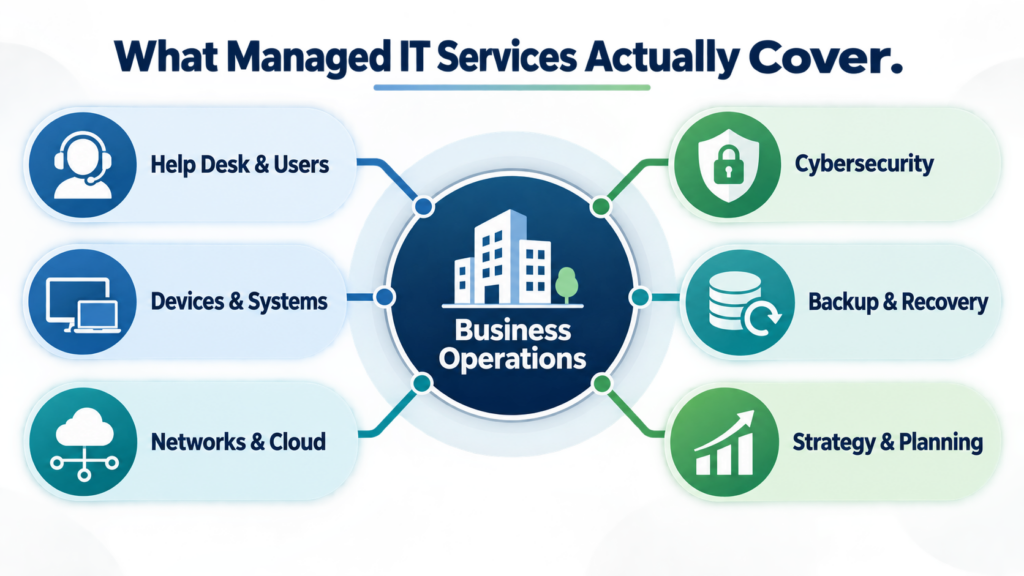
Depending on the agreement, managed IT services may include:
- Help desk and end-user support
- Computer, server, and network monitoring
- Software and operating-system patch management
- User account and permission management
- Employee onboarding and offboarding
- Endpoint security and threat monitoring
- Firewall and network administration
- Microsoft 365 or other cloud-platform management
- Backup monitoring and recovery planning
- Hardware and software inventory
- Technology documentation
- Vendor coordination
- IT budgeting and lifecycle planning
- Cybersecurity guidance
- Strategic technology consulting
- Fractional CIO or CTO leadership
The important distinction is that managed IT is not one product. It is an operating model.
A business delegates defined technology responsibilities to an outside team while retaining control over its business decisions, data, policies, and priorities.

Managed IT in Plain English
In practical terms, managed IT means your business has an accountable technology team without necessarily building a complete internal IT department.
When an employee cannot log in, there is someone to call.
When a workstation stops reporting security information, someone notices.
When a critical software platform is approaching renewal, someone can help evaluate the agreement.
When the company hires five employees, opens another location, changes applications, or needs to meet a customer’s security requirements, leadership has an experienced technology advisor available.
The goal is not to eliminate every technology problem. No provider can honestly guarantee that hardware will never fail, software will never malfunction, or attackers will never attempt to compromise a system.
The goal is to make technology more visible, controlled, supportable, secure, and recoverable.
Why Small and Mid-Sized Businesses Need a Different IT Model
Large enterprises may employ separate teams for cybersecurity, networking, cloud administration, end-user support, procurement, compliance, and technology strategy. Most smaller organizations cannot justify that structure.
However, smaller businesses still depend on many of the same technologies:
- Email and collaboration platforms
- Cloud applications
- Customer and financial information
- Remote access
- Business Wi-Fi
- Internet-connected equipment
- Mobile devices
- File-sharing systems
- Industry-specific software
- Online banking and payment systems
- Backups and recovery tools
The technical environment may be smaller, but the business dependency is not.
A 30-person company can be seriously disrupted if employees cannot access email, scheduling software, customer records, production systems, or shared files. A failed server, compromised administrator account, internet outage, or corrupted cloud environment can affect nearly every department at once.
Small businesses also face a difficult staffing gap: they often need broader expertise than one employee can provide, but they are not ready to hire a full internal technology team.
Managed IT can bridge that gap by providing access to multiple technical disciplines through one coordinated relationship.
The Three Layers of Effective Managed IT
A useful way to evaluate managed IT services is to separate them into three layers: support, management, and leadership.
Layer One: Daily IT Support
This is the most visible layer. It includes resolving the problems employees experience during the workday:
- Login failures
- Email problems
- Printer and peripheral issues
- Software errors
- Slow computers
- File-access problems
- New-device configuration
- Password resets
- Connectivity problems
- Remote-work issues
Responsive support matters because unresolved problems consume employee time. However, help desk service alone does not constitute complete managed IT.
If a provider resolves the same issue every week without identifying the underlying cause, the business is receiving repeated repair—not effective technology management.
Layer Two: Proactive Technology Management
The second layer focuses on the health, security, and consistency of the overall environment.
This can include:
- Monitoring devices and infrastructure
- Installing security updates
- Reviewing storage and system capacity
- Standardizing device configurations
- Tracking warranties and equipment age
- Managing user accounts and permissions
- Monitoring backup jobs
- Maintaining network equipment
- Documenting systems and vendors
- Reviewing security alerts
- Identifying recurring support patterns
Proactive management helps reduce preventable failures and makes the environment easier to support.
For example, resetting an employee’s password is support. Requiring multi-factor authentication, documenting the employee’s access, reviewing risky sign-ins, and disabling the account promptly when the employee leaves are management.
Layer Three: Technology Leadership
The third layer connects technology decisions to business decisions.
This is where a managed IT provider begins functioning as a fractional CIO or CTO partner.
Technology leadership may include:
- Creating a multi-year technology roadmap
- Planning hardware replacements
- Evaluating software and vendors
- Building an IT budget
- Preparing for growth or additional locations
- Reviewing cyber-insurance requirements
- Supporting compliance conversations
- Identifying operational bottlenecks
- Planning business continuity
- Helping leadership prioritize risk
- Evaluating whether proposed technology delivers business value
A business does not need every new tool. It needs the right systems, configured appropriately, with clear ownership and a sensible plan.
Business Technology Consulting
What Should Be Included in Managed IT Services?
Managed service agreements vary considerably. Business owners should never assume that a term such as “fully managed” or “unlimited support” has a universal definition.
A complete proposal should clearly identify what is included, what is excluded, how responsibilities are divided, and which services require additional fees.
Help Desk and User Support
Employees need a straightforward process for requesting assistance by phone, email, chat, or a support portal.
The agreement should explain:
- Supported hours
- After-hours availability
- How priorities are assigned
- Expected acknowledgment or response targets
- Whether support is remote, onsite, or both
- Which users and devices are covered
- Whether projects are billed separately
Response time and resolution time are not the same. A provider may acknowledge a request quickly while the final solution requires more investigation, a vendor response, replacement hardware, or an onsite visit.
Monitoring and Maintenance
Monitoring tools can provide visibility into device health, storage capacity, system availability, security status, and other conditions.
Monitoring is valuable only when:
- The right systems are being monitored.
- Alerts are configured meaningfully.
- Someone reviews and acts on those alerts.
- Recurring conditions are investigated.
- The provider communicates material findings.
More alerts do not automatically create better management. Excessive low-value notifications can hide the few alerts that genuinely require action.
Patch and Update Management
Software vulnerabilities and unsupported systems increase business risk. Managed IT providers commonly oversee operating-system updates and, depending on the agreement, updates for supported third-party applications.
Patch management should account for:
- Device inventory
- Update schedules
- Critical security patches
- Restart requirements
- Failed installations
- Application compatibility
- Unsupported software
- Exceptions for critical systems
- Reporting and follow-up
Installing updates is only part of the process. A mature provider also identifies devices that failed to update and confirms whether unsupported systems need to be replaced, isolated, or otherwise addressed.
User Identity and Access Management
User access is one of the most consequential parts of modern business IT.
Managed identity services may include:
- Creating and disabling accounts
- Assigning licenses
- Configuring multi-factor authentication
- Managing group membership
- Applying role-based permissions
- Reviewing administrator accounts
- Supporting password-management practices
- Controlling access to shared files
- Coordinating onboarding and offboarding
Access should be based on business need, not convenience. Employees should receive the permissions necessary for their work without automatically receiving broad administrative control.
NIST’s Cybersecurity Framework 2.0 small-business guidance recommends restricting sensitive information to people who need it, using multi-factor authentication, maintaining asset visibility, patching systems, testing backups, and preparing response and recovery plans. These are business-management responsibilities as much as technical controls. NIST Cybersecurity Framework 2.0 Small Business Quick-Start Guide
Cybersecurity Oversight
Managed IT and managed cybersecurity overlap, but they are not always identical.
A basic managed IT agreement may include antivirus, patching, firewall administration, and backup monitoring. A more mature security program may also require:
- Endpoint detection and response
- Centralized log collection
- Security-event investigation
- Email threat protection
- Vulnerability assessments
- Security-awareness training
- Privileged-access controls
- Incident-response planning
- Compliance support
- Dark-web or credential-exposure monitoring
- Security policy development
- Cyber-insurance documentation
- Managed detection and response
Business owners should ask who reviews security alerts, when alerts are reviewed, what happens after suspicious activity is detected, and whether incident-response labor is included.
Installing a security tool is not the same as operating a security program.
Backup, Disaster Recovery, and Business Continuity
These terms are often used interchangeably, but they solve different problems.
- A backup is a separate copy of data.
- Recovery is the process of restoring data or systems.
- Disaster recovery addresses how critical technology will be restored after a major disruption.
- Business continuity addresses how the organization will continue essential operations during and after that disruption.
A backup can complete successfully and still fail the business if restoration takes too long, critical applications were excluded, credentials are unavailable, or the copied data has also been damaged.
A managed IT provider should help leadership answer:
- What systems and data are being backed up?
- How often are backups created?
- Where are they stored?
- How long are they retained?
- Are backup systems separated from ordinary administrator access?
- Are restoration tests performed?
- How much data could the business tolerate losing?
- How long could each department operate without its systems?
- Which systems must be restored first?
- Who makes decisions during a major outage?
The question is not merely, “Do we have backups?” It is, “Can we restore the right information within a timeframe the business can survive?”
Network and Infrastructure Management
The network connects employees, applications, devices, cloud platforms, phones, printers, security systems, and business equipment.
Managed network services may cover:
- Firewalls
- Switches
- Wireless access points
- Internet connections
- Virtual private networks
- Network segmentation
- Server infrastructure
- Structured cabling coordination
- Bandwidth and performance monitoring
- Secure remote access
- Guest networks
- Equipment lifecycle planning
Persistent Wi-Fi or connectivity problems should not be treated as mysteries. They should be investigated through measurements, configuration review, physical inspection, traffic analysis, interference assessment, equipment evaluation, and an understanding of how the space is used.
Cloud and Microsoft 365 Management
Moving systems to the cloud does not remove the need for management. It changes what must be managed.
Cloud-platform responsibilities may include:
- License administration
- Account security
- Multi-factor authentication
- Conditional-access policies
- Email configuration
- File-sharing permissions
- Retention settings
- Collaboration structures
- Device enrollment
- Security monitoring
- Backup strategy
- Application integrations
A cloud provider maintains its platform, but the customer and its IT partner are generally responsible for how accounts, access, data, and security settings are configured.
Microsoft Secure Score, for example, can help organizations evaluate recommended security actions within supported Microsoft environments. It is a measurement and planning aid—not a guarantee that an organization is secure. Microsoft Secure Score documentation
IT Documentation
Reliable IT should not depend on what one person remembers.
Useful documentation may include:
- Hardware and software inventories
- Network diagrams
- Vendor contact information
- Warranty and renewal dates
- Administrative ownership
- Supported configurations
- Backup procedures
- Recovery priorities
- Internet and telecommunications details
- Onboarding and offboarding procedures
- Licensing information
- Incident-response contacts
Documentation improves support speed, continuity, accountability, and decision-making. It also reduces the risk created when an employee, contractor, or provider leaves.
Sensitive documentation must itself be stored and protected appropriately.
Vendor Management
Growing businesses often depend on multiple technology vendors. When something fails, each vendor may initially claim another system caused the problem.
A managed IT provider may help coordinate:
- Internet providers
- Phone-system companies
- Software vendors
- Copier and printer vendors
- Cloud providers
- Cabling contractors
- Security-system companies
- Industry-specific application vendors
Vendor coordination is more than making phone calls. It requires enough technical knowledge to isolate the failure, communicate evidence, track responsibility, and verify that the final solution works.
Managed IT Versus Break-Fix IT
Break-fix IT is a reactive model: the business calls for help after a system has already failed or a user encounters a problem.
This can appear economical because there may be no recurring fee. However, the visible repair invoice does not represent the complete cost.
The business may also absorb:
- Employee downtime
- Lost billable hours
- Delayed customer service
- Repeated failures
- Emergency labor rates
- Rush hardware purchases
- Inconsistent configurations
- Undocumented systems
- Security exposure
- Leadership time spent coordinating vendors
Managed IT changes the financial incentive.
Under break-fix service, the provider earns revenue when problems require billable work. Under a properly structured managed agreement, both the business and provider benefit when systems remain stable, users are supported efficiently, and recurring problems are reduced.
Managed IT does not eliminate projects, failures, or additional costs. It creates a more consistent framework for preventing problems, managing routine responsibilities, and planning expenses.
Managed IT Versus an Internal IT Department
The decision is not always either-or.
Businesses generally use one of four models:
- Fully outsourced IT: An outside provider handles most technology responsibilities.
- Co-managed IT: Internal employees work with an outside provider.
- Project-based IT: Specialists are engaged for defined initiatives.
- Internal IT: Employees manage technology in-house.
A fully outsourced arrangement may work well for a company without dedicated IT staff.
Co-managed IT can support an internal technician or IT manager by providing additional tools, coverage, cybersecurity capabilities, project support, or specialized expertise.
An internal department can provide close operational familiarity, but one or two employees may still struggle to cover support, networking, cloud systems, security, documentation, strategy, vacations, and after-hours incidents.
The correct choice depends on business size, complexity, risk, existing staff, service expectations, and budget.
What Does Managed IT Cost?
Managed IT pricing varies according to the number of users, devices, locations, systems, support hours, security requirements, and included services.
Common pricing structures include:
- Per-user pricing
- Per-device pricing
- Tiered service plans
- Flat monthly pricing
- Monitoring-only agreements
- Co-managed agreements
- Customized service packages
- Separate project or onsite rates
A low monthly price may exclude important services such as backup, advanced cybersecurity, onsite support, after-hours assistance, network equipment, projects, compliance help, or recovery labor.
A higher price is not automatically better either. The relevant question is whether the agreement covers the responsibilities, risks, and service levels the business actually needs.
When comparing proposals, normalize them. Create a side-by-side table showing:
- Covered users and devices
- Support hours
- Onsite support
- Security tools
- Backup services
- Cloud management
- Network management
- Strategic planning
- Included projects
- After-hours rates
- Contract term
- Termination provisions
- Data and documentation access
The cheapest proposal can become the most expensive if important responsibilities remain unassigned.
Business Technology Consulting
The Hidden Cost of Unmanaged IT
Many businesses evaluate IT only as a line-item expense. A more useful analysis considers the cost of technology friction.
Suppose 25 employees each lose 12 minutes per workday to slow systems, access problems, repeated restarts, unreliable Wi-Fi, or minor support issues. Collectively, that equals five labor hours every day—or approximately 1,250 hours across 250 working days.
Not all technology friction can be eliminated, and not every lost minute should be attributed to IT. The example demonstrates why small recurring problems deserve attention.
The most expensive technology issue is not always a dramatic server failure. It may be a minor problem multiplied across many employees for months.
This leads to an important management principle:
IT performance should be evaluated by its effect on business operations, not only by whether the equipment is technically functioning.
A computer that turns on may still be too slow for the employee’s work. A backup job marked “successful” may still be inadequate for the company’s recovery needs. A firewall may be online while running an outdated configuration. A cloud application may be available while users have excessive permissions.
“Working” and “working appropriately” are not the same standard.
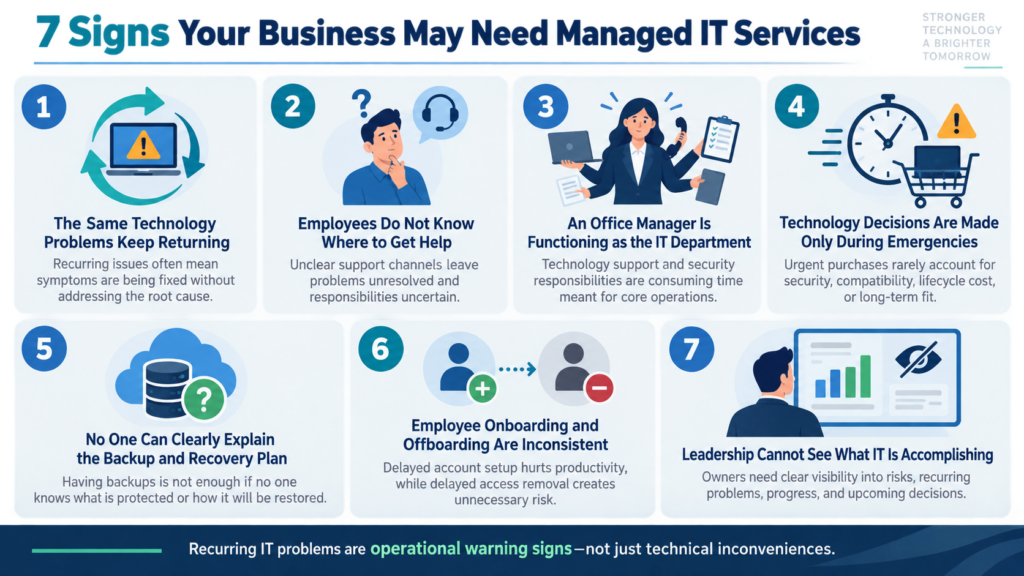
Seven Signs Your Business May Need Managed IT Services
1. The Same Technology Problems Keep Returning
Recurring problems usually indicate that symptoms are being treated without addressing root causes.
2. Employees Do Not Know Where to Get Help
When support depends on finding “the person who knows computers,” problems remain unresolved and responsibilities become unclear.
3. An Office Manager Is Functioning as the IT Department
Office managers often become responsible for accounts, devices, vendors, and troubleshooting because they are organized and dependable. That does not mean IT administration is the best use of their time—or that they should carry security responsibility without adequate support.
4. Technology Decisions Are Made Only During Emergencies
Emergency purchases tend to prioritize immediate restoration rather than security, compatibility, lifecycle cost, or long-term fit.
5. No One Can Clearly Explain the Backup and Recovery Plan
If the answer is merely “everything is in the cloud” or “the backup software says it is working,” additional review is warranted.
6. Employee Onboarding and Offboarding Are Inconsistent
Delayed account creation hurts productivity. Delayed account removal creates unnecessary exposure.
7. Leadership Cannot See What IT Is Accomplishing
Business owners should not need to understand every technical detail, but they should receive clear information about risks, recurring problems, system health, upcoming decisions, and progress.
How to Choose a Managed IT Provider
A strong provider should be evaluated on accountability, process, communication, technical capability, security practices, and business understanding.
Ask How the Provider Learns Your Business
Technology recommendations should reflect:
- How employees work
- Which systems are critical
- When the business operates
- How customers are served
- What information is sensitive
- What growth plans exist
- Which regulations or contracts apply
- How much disruption the company can tolerate
A provider that begins prescribing tools before understanding the operation may be solving the wrong problem.
Ask Who Owns Each Responsibility
Responsibility should be explicit.
Who approves new accounts? Who reviews security alerts? Who verifies backups? Who contacts the cyber-insurance carrier? Who maintains application integrations? Who manages line-of-business software? Who approves hardware purchases?
Managed IT works best when the provider, business leadership, employees, and other vendors understand their roles.
Ask How Security Is Managed Internally
An IT provider may hold privileged access to many customer systems. That makes the provider’s own security practices relevant.
Ask about:
- Multi-factor authentication
- Privileged-account controls
- Employee background screening where appropriate
- Security-awareness training
- Access logging
- Documentation protection
- Incident-response procedures
- Cyber insurance
- Separation of customer environments
- Third-party tools and subcontractors
NIST recommends evaluating cybersecurity risks created by suppliers and other third parties before entering formal relationships. NIST SP 1300
Ask What Happens During a Cybersecurity Incident
Determine:
- Who receives alerts
- Whether monitoring is continuous or limited to business hours
- Who has authority to isolate a device
- What response labor is included
- Whether forensic investigation is available
- How legal, insurance, and regulatory contacts are coordinated
- How unaffected systems are protected
- How recovery decisions are documented
The FTC provides cybersecurity guidance specifically for small businesses, including practical resources related to data protection and breach response. FTC Cybersecurity for Small Business
Ask How Performance Is Reported
Useful reporting should support business decisions rather than overwhelm leadership with technical noise.
Reports may address:
- Support volume and recurring issues
- Device and software inventory
- Patch status
- Security findings
- Backup performance and testing
- Equipment approaching replacement
- Projects and improvements
- Unresolved risks
- Upcoming budget needs
- Progress against the technology roadmap
Metrics should not be mistaken for outcomes. Closing many tickets may indicate efficient support—or an environment producing too many recurring problems.
Ask About Contract Exit and Data Portability
Before signing, understand:
- Contract length
- Renewal terms
- Cancellation requirements
- Ownership of hardware and licenses
- Access to documentation
- Credential-transfer procedures
- Data-export options
- Offboarding fees
- Transition assistance
A healthy technology relationship should be built on performance and trust, not operational captivity.
Red Flags When Evaluating an MSP
Proceed carefully when a provider:
- Promises that cyberattacks or downtime can be completely prevented
- Cannot clearly define included services
- Uses “unlimited” without meaningful boundaries
- Avoids discussing its own security practices
- Does not document the environment
- Recommends products before assessing business needs
- Cannot explain backup restoration testing
- Provides no technology planning
- Relies heavily on one technician with no coverage plan
- Discourages access to your own documentation or credentials
- Uses fear as the primary sales tactic
- Cannot explain how support issues are prioritized
- Treats every customer as though their risks and workflows are identical
The best provider does not make technology sound magical. It makes responsibilities, risks, options, and decisions understandable.
Common Managed IT Myths
Myth: Managed IT Is Only for Large Companies
Managed IT is often most valuable to businesses that are large enough to depend heavily on technology but not large enough to maintain a complete internal IT department.
Myth: Moving to the Cloud Eliminates IT Management
Cloud services still require account administration, access control, security configuration, licensing, backup decisions, monitoring, and user support.
Myth: Antivirus Is a Complete Cybersecurity Strategy
Modern security requires layers involving identity, devices, email, networks, data, employees, monitoring, response, and recovery.
CISA’s small- and medium-business guidance emphasizes practical risk-reduction measures rather than reliance on a single security product. CISA: Secure Your Business
Myth: Backups Guarantee Fast Recovery
A backup is useful only if it includes the necessary information, remains intact, can be accessed during an emergency, and can be restored within an acceptable period.
Myth: A Quiet Help Desk Means Everything Is Healthy
Employees may have stopped reporting problems. Monitoring may be incomplete. Aging systems may still function while risk accumulates. Business leaders need proactive reviews, not just ticket counts.
Myth: Managed IT Removes All Responsibility from the Business
Leadership still determines priorities, approves policies, allocates budget, manages employees, evaluates risk, and makes business decisions. The provider supplies expertise and operational support; it does not replace responsible governance.

A Better Way to Measure Managed IT Value
Managed IT value should not be measured solely by how many tickets a provider closes.
A stronger evaluation considers whether:
- Employees receive dependable assistance.
- Recurring problems are decreasing.
- Critical systems are documented.
- User access is controlled.
- Equipment is replaced deliberately rather than during emergencies.
- Backups are monitored and restorations are tested.
- Security risks are prioritized.
- Leadership understands upcoming decisions.
- Technology expenses are becoming more predictable.
- The environment can support growth.
- The business has a realistic incident and recovery plan.
- Technology consumes less management attention.
The ideal outcome is not constant visible activity. It is a well-managed environment in which technology works quietly, employees know where to get help, and leadership can make decisions with confidence.
What the First 90 Days Should Look Like
The beginning of a managed IT relationship should be structured and transparent.
Days 1–30: Discovery and Stabilization
The provider should begin learning the business and documenting the environment.
Typical activities include:
- Inventorying users, devices, systems, vendors, and locations
- Identifying critical applications
- Reviewing accounts and administrative access
- Deploying approved management and security tools
- Reviewing network infrastructure
- Evaluating backup coverage
- Identifying urgent risks
- Establishing support procedures
- Collecting available documentation
Days 31–60: Standardization and Risk Reduction
After discovery, the provider can begin addressing inconsistencies:
- Closing critical patch gaps
- Improving account security
- Standardizing devices
- Correcting backup issues
- Removing obsolete access
- Organizing licensing
- Updating documentation
- Resolving recurring support problems
- Prioritizing unsupported systems
Days 61–90: Planning and Measurement
The relationship should then move beyond stabilization:
- Present a technology-health summary
- Identify unresolved business risks
- Create equipment-lifecycle priorities
- Establish reporting expectations
- Develop an initial budget
- Recommend near-term projects
- Outline a technology roadmap
- Schedule recurring business reviews
The first 90 days should not produce a surprise shopping list without context. Recommendations should be prioritized by business impact, urgency, cost, and available alternatives.
The NetTech Approach: Business First, Technology Second
NetTech provides relationship-driven IT support and technology consulting for small and mid-sized businesses, particularly organizations with approximately 5–150 employees.
Rather than beginning with hardware or a predetermined technology package, NetTech starts by understanding how the company operates:
- What repeatedly slows employees down?
- Which systems are essential?
- Where is the business exposed?
- Which decisions are creating uncertainty?
- How is the company expected to grow?
- What improvements will deliver meaningful operational value?
That consultative approach allows NetTech to function as more than a help desk. Depending on the organization’s needs, NetTech can serve as its day-to-day support team, infrastructure advisor, cybersecurity resource, vendor coordinator, or fractional CIO/CTO partner.
Core capabilities include:
- Managed IT support
- Network design, maintenance, and troubleshooting
- Cybersecurity and data protection
- Cloud and Microsoft 365 guidance
- Backup, recovery, and business-continuity planning
- Technology strategy and fractional leadership
NetTech supports growing organizations from locations serving Greater Chicagoland, Central Tennessee, and Florida’s Suncoast region. Its model is particularly well suited to professional offices, healthcare practices, manufacturing and light-industrial operations, construction and engineering companies, hospitality businesses, service companies, and multi-location organizations.
From Reactive IT to Confident Operations
Most businesses do not decide to seek managed IT services because they want more technology.
They want fewer interruptions. They want employees to receive help without involving management in every problem. They want to know that critical information is protected, accounts are controlled, backups can be recovered, and technology investments are serving a clear purpose.
They want someone to see the whole picture.
That is the real purpose of managed IT.
It replaces scattered responsibility with accountability, emergency decisions with planning, and technical uncertainty with a process leadership can understand.
You do not need to wait for a major failure or cybersecurity incident to improve the way your technology is managed. The right first step is a clear conversation about what your business relies on today, where frustration or risk exists, and what a practical path forward should look like.
If technology is consuming too much staff time, creating uncertainty, or failing to keep pace with your growth, schedule a technology consultation with NetTech.
NetTech will help you evaluate your current environment, clarify the most important priorities, and build a technology approach that supports your people, protects your operations, and gives your business room to grow.
Schedule a NetTech technology consultation
Frequently Asked Questions About Managed IT Services
What does a managed IT service provider do?
A managed IT service provider assumes defined, ongoing responsibilities for supporting, maintaining, monitoring, securing, and improving a company’s technology. Services may include help desk support, patching, account management, network administration, cybersecurity, backups, documentation, vendor coordination, and strategic planning.
What size business benefits from managed IT?
Managed IT can benefit organizations of many sizes, but it is especially useful for businesses that depend heavily on technology and do not have a complete internal IT department. NetTech commonly works with small and mid-sized businesses of approximately 5–150 employees.
Is managed IT the same as a help desk?
No. A help desk primarily assists users with immediate problems. Complete managed IT combines user support with proactive system management, security oversight, documentation, planning, and accountability.
How is managed IT different from break-fix support?
Break-fix support begins after something goes wrong and is typically billed by the incident or hour. Managed IT creates an ongoing relationship focused on maintaining systems, supporting users, reducing preventable problems, and planning future needs.
Can an MSP work with our existing IT employee?
Yes. This is commonly called co-managed IT. The provider may supply tools, additional coverage, cybersecurity services, project expertise, help desk capacity, or strategic guidance while the internal employee retains other responsibilities.
Does managed IT include cybersecurity?
Most managed IT plans include some security services, but the scope varies. Businesses should verify which protections, monitoring, response services, assessments, training, and recovery capabilities are included.
Are cloud backups included in managed IT?
They may be, but inclusion should never be assumed. The agreement should specify which systems are backed up, how frequently, where copies are stored, how long they are retained, and whether restoration testing is included.
How much do managed IT services cost?
Costs depend on the number of users, devices, locations, applications, support hours, security needs, and services included. Pricing may be per user, per device, tiered, or customized. Proposals should be compared according to scope and responsibility—not price alone.
How long does it take to transition to a managed IT provider?
The initial transition commonly occurs in phases involving discovery, documentation, tool deployment, account review, risk prioritization, and stabilization. The exact timeframe depends on the organization’s size, complexity, documentation quality, and existing risks.
How do we know whether an MSP is doing a good job?
Look beyond ticket counts. Evaluate response quality, recurring-problem reduction, documentation, security improvements, backup testing, technology planning, communication, risk visibility, budget predictability, and whether employees and leadership experience less technology-related disruption.
Turn Technology Into a Business Advantage with NetTech
Technology problems rarely remain isolated for long. A slow computer becomes lost productivity. An unmanaged account becomes a security risk. An untested backup becomes a serious business-continuity concern. And when no one has clear responsibility for the entire technology environment, owners, operations leaders, and office managers are left carrying decisions they should not have to make alone.
Managed IT services create a better path forward—not by adding unnecessary tools or making technology more complicated, but by bringing structure, accountability, and experienced guidance to the systems your business already depends on.
The right IT partner helps your company move from reacting to problems toward preventing them. Employees know where to turn for support. Leadership receives clear recommendations instead of technical jargon. Security, backups, access, equipment, and future investments are managed as connected parts of the business rather than separate emergencies.
That is the role NetTech is built to fill.
NetTech takes the time to understand how your people work, which systems matter most, where risks and inefficiencies exist, and what your business needs next. Whether you need dependable day-to-day support, stronger cybersecurity, a more reliable network, better recovery planning, or senior-level technology guidance, the process begins with a practical conversation—not a predetermined package or high-pressure sales pitch.
You do not need to wait for a major outage, failed backup, or cybersecurity incident to take control of your technology. If recurring problems are consuming staff time, important responsibilities are unclear, or your systems are no longer keeping pace with your company, now is the right time to evaluate a more proactive approach.
Schedule a technology consultation with NetTech today. Together, you can build a more reliable, secure, and manageable technology environment—one that works quietly in the background while your people focus on serving customers, improving operations, and growing the business.